
This is the first of two notes on rebuilding session management at MO Marketplace. This one is the backend. Part 2 covers the website, where the browser adds its own rules.
The general mechanics - how access and refresh tokens work, signing with a key pair, rotation and reuse detection, and the races that look like theft - are explained in Session Security in Practice. This note is about the decisions this system needed on top of them.
The problem
Customers sign in on a mobile app and the website. MO's internal staff - the people who run the marketplace - sign in to an internal admin panel. This note calls each side a surface: the customer surface (mobile app and website) and the staff surface (admin panel). Other services accept the tokens these logins produce.
Each login produced a long-lived signed token, and the server kept no record of the tokens it had issued. So nothing could end one early: logging out, banning an account or changing a password left an existing token working until it expired.
The fix itself is well known: short access tokens plus refresh tokens the server can revoke. What made it hard was everything around it:
- Every logged-in request goes through this code. A mistake here would log out every user, not break one feature.
- A mass logout was not acceptable. Every customer signed out at once means abandoned carts and lost sales, and some of them may not come back.
- Installed mobile apps cannot be forced to update. Older versions had to keep working.
- Other services check the same tokens and deploy on their own schedules.
The design at a glance
Each row is a standard pattern, covered in the blog post. The rest of this note is what it took to make them work here, and to switch over without logging anyone out.
Moving to a key pair without logging anyone out
Other services verify the backend's tokens, so a shared secret would have let any of them forge one. The backend now signs with RS256, and the others get only the public key (the blog explains why that matters).
- The private key lives in a secrets store, one per environment, that only authorized people and services can read. It is attached at deploy time, and the server refuses to start without it.
- Every token carries a key ID, so a future key rotation can run two keys side by side.
- Signing happens in exactly one function, so every path that issues a token gets the same algorithm, key ID, lifetime and audience.
The hard part was the switch itself. If the server simply started verifying with the new algorithm, every token already issued would fail - the mass logout this work had to avoid. So for a while the server runs two separate verifiers, each locked to one algorithm and one key: one for new tokens, one for old ones. Locking each to its own key also keeps algorithm confusion closed during the transition; I tested this by sending a forged token, and it was rejected with a 401. Once every old token has expired, the old verifier is deleted as its own change, without touching the new one.
A token that carries identity only
The old payload carried far more than a token needs. Before changing the payload, I checked what every client and service actually reads from it. Removing a field a client depends on breaks that client. The token now identifies the user and the session, and little else:
{
  "sub": "<user id>",
  "sid": "<session id>",
  "aud": "<surface>",
  "iat": 1759046400,
  "exp": 1759047300
}sidis created at login and kept for the life of that login, so one login can be ended on its own (how the pieces fit).audsays which surface the token is for (covered below).- There are no roles. Roles are read from the database on every request, so a role change takes effect on the next request instead of when the token expires.
Every request checks the account, not just the signature
A valid signature only proves the backend issued the token. It says nothing about whether the account is still allowed in. So both verifiers now call one function that loads the user and decides whether the request may continue:
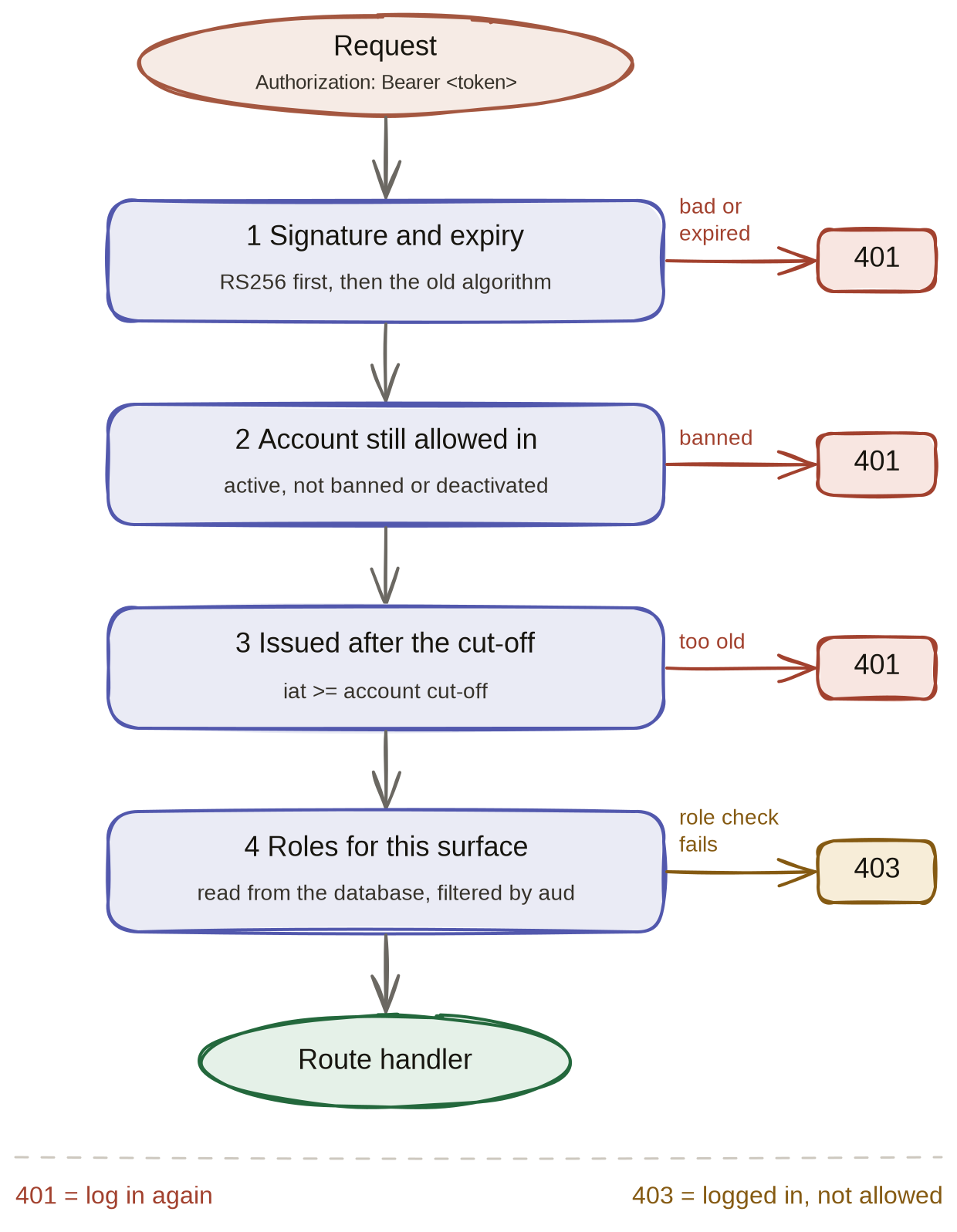
The server already loaded the user on every request before this work, so each new check is a comparison on data it already has, not an extra database query. A refused role check is always a 403, never a 401, because clients log out on a 401 (401 or 403).
From token to AuthUser
The account check above returns one typed object, AuthUser. It is everything a route ever sees of the token:
type AuthUser = {
  id: string; // from the token's sub
  sid?: string; // the login this request belongs to; missing on old tokens
  aud: Audience; // which surface the token was issued for
  roles: string[]; // loaded from the database, filtered to this surface
  isStaff: boolean; // a staff token and a staff role actually held
  // ...plus the few profile fields clients display
};
A request moves through it in four steps:
- The verifier checks the signature and expiry, then hands the claims to the account check.
- The account check builds
AuthUserfrom the claims and the freshly loaded account: the ID fromsub, the session fromsid, the surface fromaud, and roles filtered to that surface. If any check fails, the request ends with a401and never reaches a route. - The controller asks for what it needs - the whole
AuthUser, or a single field such as the user ID - and the field name is checked against the type. - Each service method takes only the fields it reads, never the whole user.
// before: untyped, so even a removed field name compiles
getMyOrders(request: any) {
  return this.orders.forUser(request.user.id);
}

// after: the field name is checked against AuthUser
getMyOrders(@CurrentUser("id") userId: string) {
  return this.orders.forUser(userId);
}
Before this, much of the codebase read the request's user without a type. The new token gave that object fewer fields, so code reading a removed field would not crash; it would quietly get undefined. With AuthUser in place, a missing field became a compile error, the compiler found a few existing bugs, and they were fixed before the new token shipped.
Sessions that can be ended
Sessions are now structured in three levels: one person (sub) has one session per login (sid), each session belongs to one surface (aud), and each session is a chain of refresh tokens that share its sid. Ending a session means cutting at one of those levels, and each cut has one function behind it:
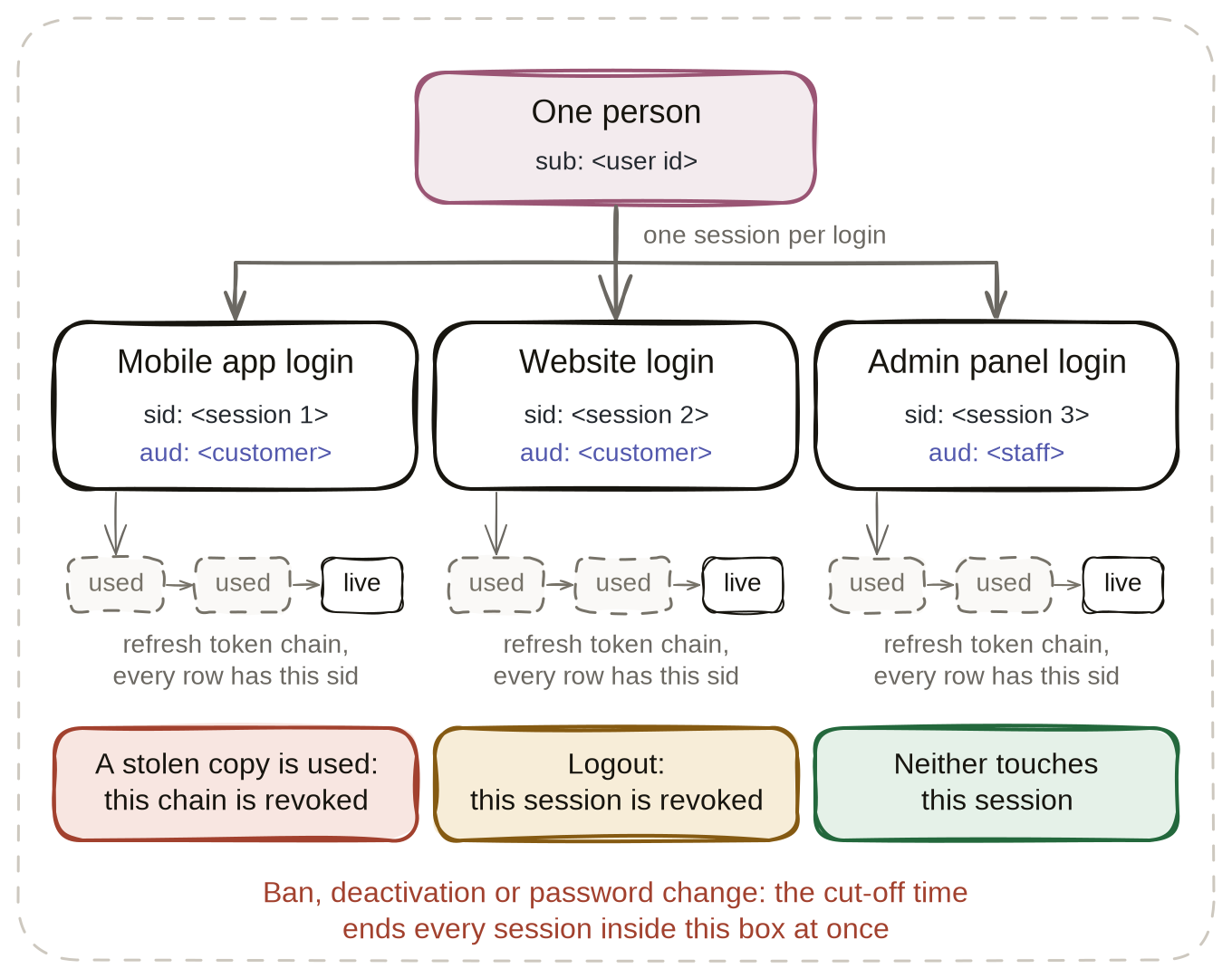
- Logout revokes this login's session (
sid). The user's other devices stay signed in. - A stolen refresh token being used revokes that session's whole chain, so both the thief's copy and the real user's copy stop working.
- A ban, deactivation or password change sets the account's cut-off time to now and revokes all its refresh tokens, in one database transaction.
The cut-off time is one timestamp per user (one of the standard ways to end a JWT early). Any access token issued before it fails the request check - including tokens already issued to installed mobile apps, with no app release needed. It is stored in whole seconds, because a token's issue time (iat) has no fractions of a second:
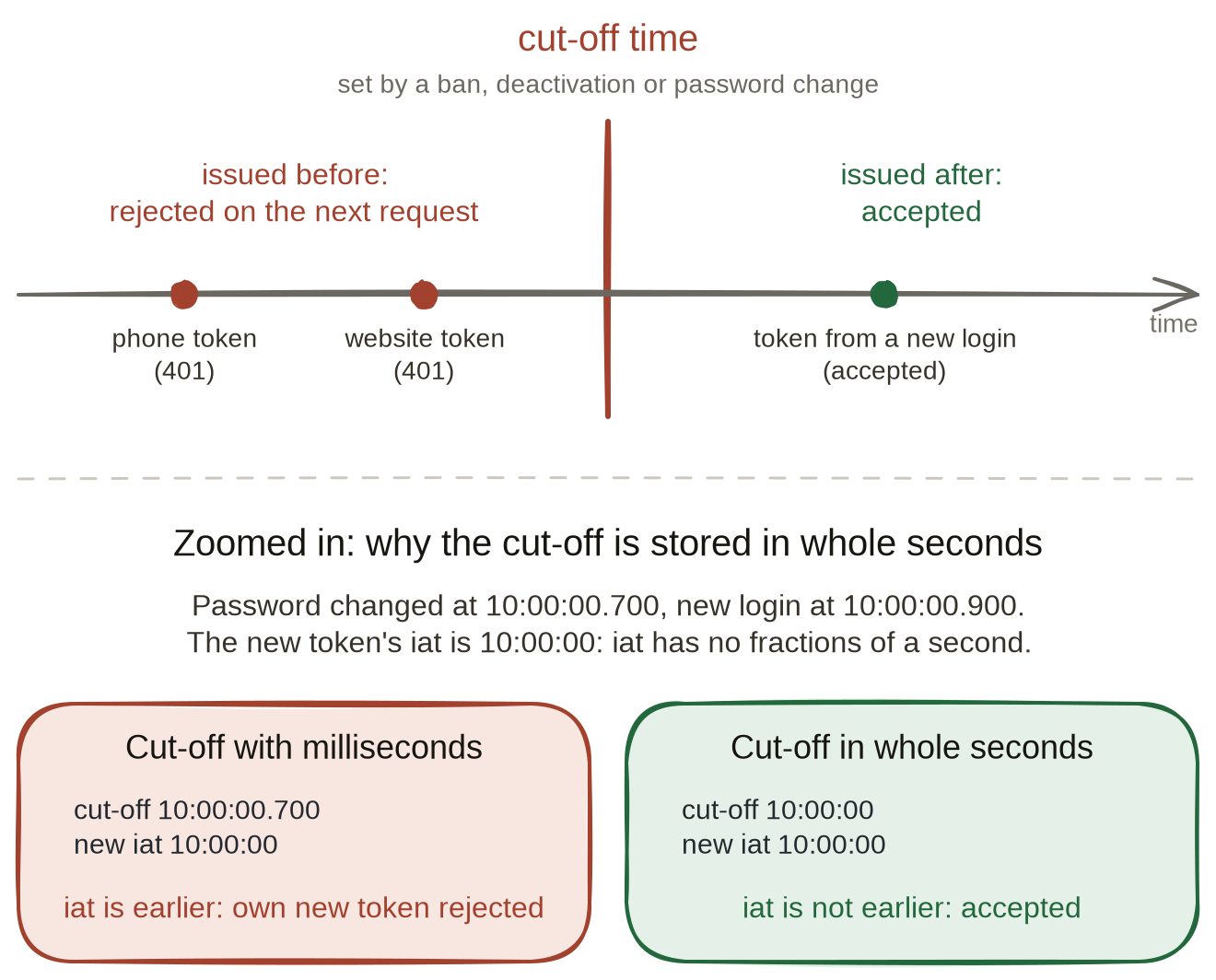
Refresh tokens last long for customers and much shorter for staff, and every use starts a fresh lifetime. Customers keep the session length they had before, so nobody logs in more often. Before the 15-minute access token was switched on, every client confirmed it could handle a 401 by refreshing and retrying the request, so no client received short tokens before it could renew them.
Rotation, and telling a retry from a theft
Refresh tokens rotate on every use and form one chain per login (a token family, in the blog's terms). If a token that was already exchanged for a new one shows up again, that chain is ended. The harder part was the normal situations that look exactly like reuse, and deciding what each one means:
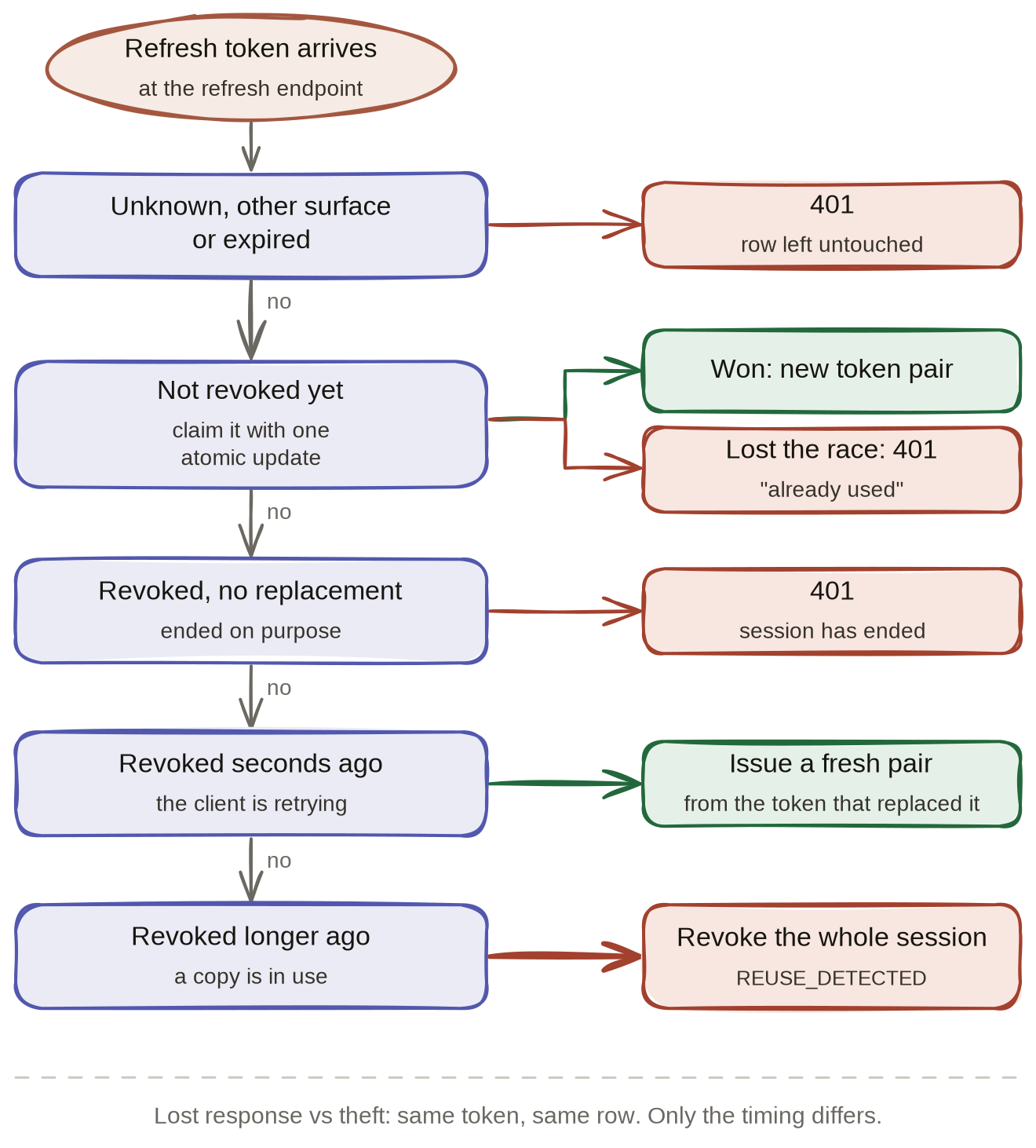
- Two refreshes at once. Two screens can send the same refresh token at the same moment. The token's row is claimed with one conditional update, so the database lets exactly one request win. The other gets a plain
401and retries with the new token its client received from the winner. Losing the race is not treated as theft. - A response that never arrived. On a bad mobile connection, the server can rotate the token and send back a new one, but the response never reaches the mobile app. The app still holds only the old token, so it retries with that. So a token revoked only seconds ago is treated as that retry, and the server issues a fresh pair from the token that replaced it. It cannot simply resend the lost token: it stores only hashes, so it no longer knows the raw value it sent.
- A revoked token with no replacement means the session was ended on purpose, by logout or a ban. If it is used again later, it is treated as an invalid token, not as theft, so nothing else is revoked.
Every ended session says why
Whenever a refresh token is revoked, the server also records why: ROTATED, LOGOUT, REUSE_DETECTED, ACCOUNT_BANNED, ACCOUNT_DEACTIVATED, ACCOUNT_INACTIVE or PASSWORD_CHANGED. No code makes decisions based on it; it exists so "why was this user logged out?" can be answered with one query. Structured auth logs carry the same reasons, and an audit table records the events worth keeping. Neither ever stores a token or a hash.
There is deliberately no EXPIRED reason. Expiry is a token's normal end, not a revocation, and the expiry date is already stored. What was missing was a record of sessions that actually ran out, which is what shows whether the staff lifetime is too short. Now, when someone tries to refresh a session that was never revoked but has expired, one audit event is written. Counting those events per surface answers the question with data.
Cleaning up without switching off theft detection
One active session writes a new row every 15 minutes, so the table needs cleaning. Which rows are deleted is the important part:
- Deleting revoked rows early would silently switch off theft detection. When someone uses a copy of a token that was already exchanged, detection works by finding that token's row. If the row is gone, the copy looks like an unknown token: the server rejects it but does not revoke the chain, and the attacker's newer token keeps working.
- Deleting expired rows is safe because of the order of the checks. The refresh check looks at expiry first, so an expired token is refused before theft detection would need its row.
The cleanup deletes by expiry date, keeps recent history for investigations, runs as a dry run by default, and deletes in batches so no single statement locks a large part of the table.
One account, a separate session per surface
Every account used to belong to one surface only, so a staff member who wanted to shop on the mobile app or website needed a second account. The new design follows identity providers like Okta and Keycloak: one person, one account, and a separate session for each surface they use.
The risk is a staff member's shopping session carrying their admin permissions, which would turn the shopping login into a way into admin functions. The token's audience (aud) prevents that:
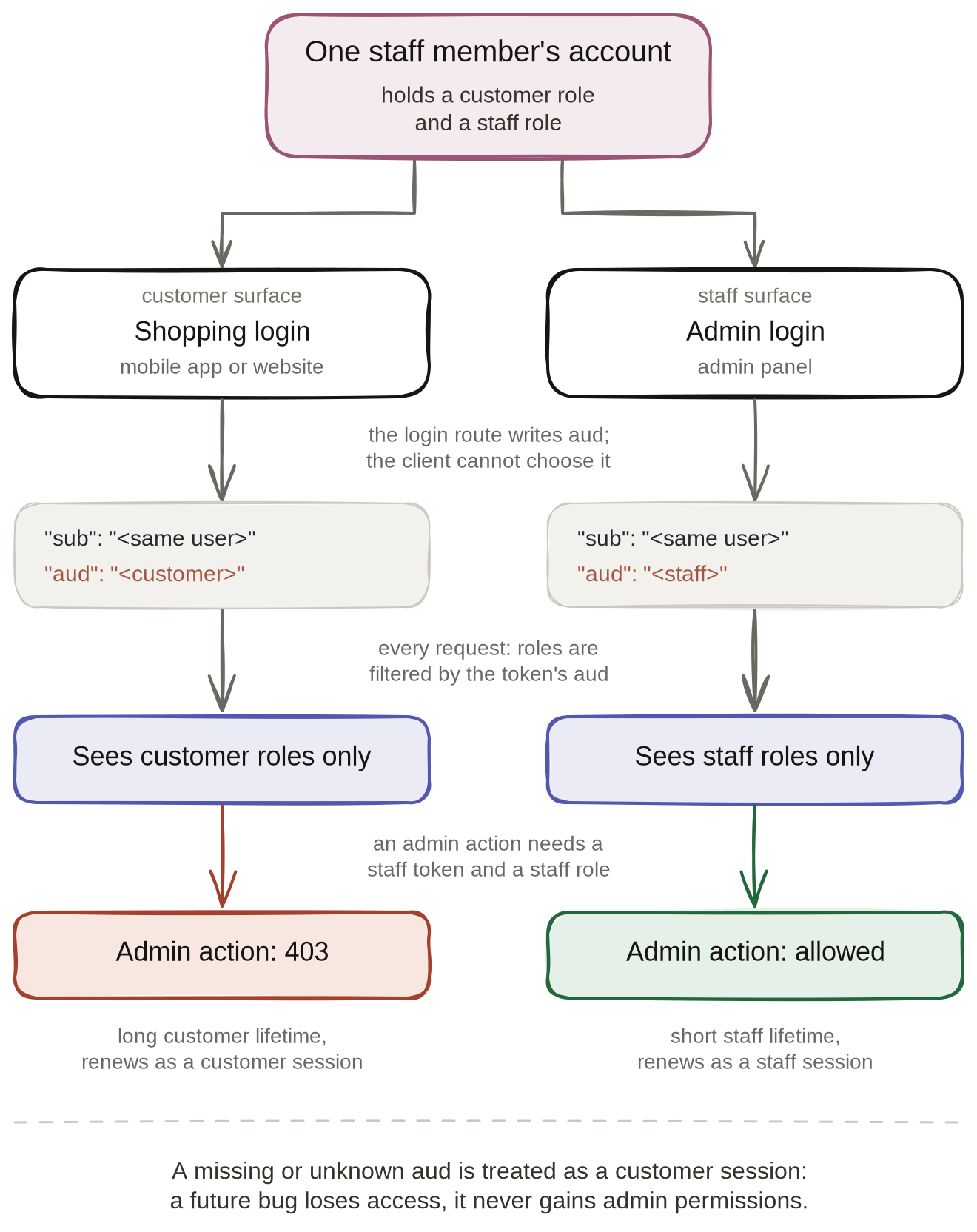
Three details the diagram does not show:
- The audience is a required argument of the one function that creates sessions. A new login route that forgets it does not compile.
- Each refresh token row stores its audience, and every rotation copies it forward. Without that, a staff member's shopping session would get the short staff lifetime, and they would have to log in again every day just to shop.
- Roles are granted when an account is created, never at login. Adding the customer role on a staff member's first shopping login looks simpler, but a role change ends all of a user's sessions, so a login that granted a role would immediately end the session it had just created.
Shipping it without logging anyone out
Auth changes were tested first on an isolated preview deployment that received no real traffic and had its own copy of the database. Every database change only added new columns or tables, so the migrations could reach production before the code that uses them, with no downtime.
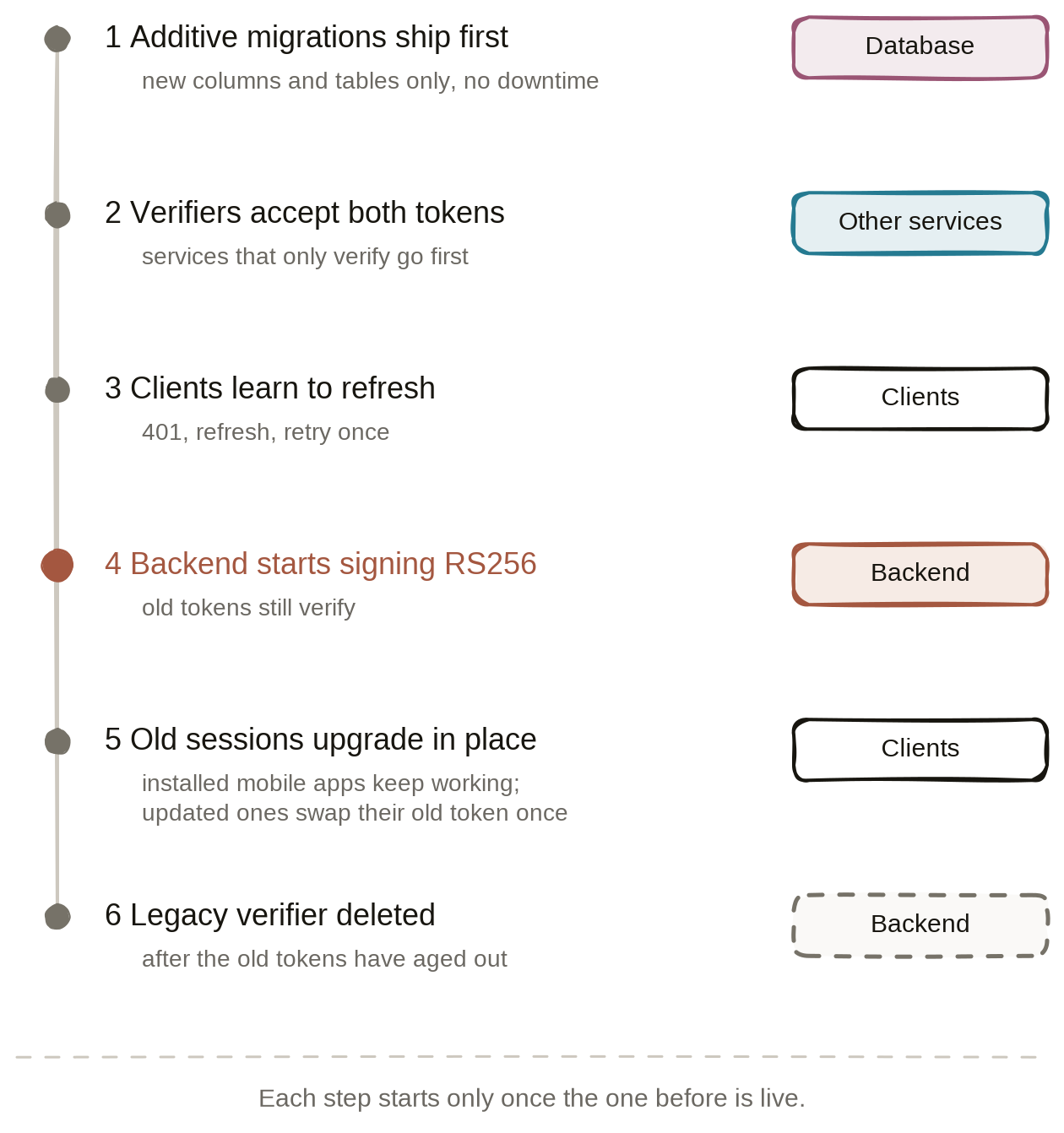
- Verifiers first, then the signer. Every service that checks tokens deployed a change that accepts both kinds before the backend started signing RS256. There was no feature flag to switch signing on later, so the backend release waited until all of them were live.
- Old mobile app versions did not block the release. They keep using the original login routes. Updated apps use new versioned routes that return an access and refresh pair.
- Old sessions upgrade in place. An updated app exchanges its old token for a new session once. The new session's
sidis derived from a hash of the old token, so each old token can be upgraded only once. - The legacy verifier is deleted once the old tokens have aged out.
What was left for the browser
The backend now issues sessions that can be trusted, renewed and ended. One thing was still the same for every client: the refresh token arrived in the JSON response body. That is the right answer for one client and the wrong one for the other:
Part 2 picks up from there: moving the website's refresh token into an HttpOnly cookie, and everything that change forced - a real CORS allowlist, an origin check on refresh, and keeping a shopper signed in across tabs without a backend outage ever logging them out.
Why this mattered
- Sessions can be ended. Logout, bans and password changes take effect on the server, for one device or for all of them.
- A stolen token has a short life. An access token is useful for minutes. A copied refresh token is detected the moment both copies are used.
- Only one service can sign a token. A leak from any service that verifies tokens cannot be used to forge one.
- Roles take effect on the next request. Nothing about permissions is frozen into a token.
- One account per person. MO's internal staff use the same account for the admin panel and for shopping, and a shopping session gets no admin permissions.
- Logouts can be explained. Every ended session records why, so the reason for any logout is one query away.
It shipped without a forced mobile app update and without a mass logout.