Session Security in Practice: JWTs, Token Rotation, and Reuse Detection
The parts build on each other. Parts 1 and 3 give a safe design for one API and one frontend; Parts 2 and 4 cover what changes when several services, many devices or unreliable mobile networks are involved. Each part opens with an "In short" box, so you can get the gist first and read the detail only where you need it. For these ideas applied to a real production backend, see Session management, part 1.
The Session Architecture
A complete session in this system has three separate pieces, each stored differently for a specific reason.
Each piece has one job:
- Access token - authenticates each API request. It is checked on every request, so it must be cheap to verify.
- Refresh token - extends the session without a new login. It is used rarely, so it can afford a database lookup - and that lookup is what makes it revocable.
- Session indicator - tells the frontend middleware a session exists, without exposing any secret value.
Part 1 of 4
Access tokens
In short
- An access token is a signed JWT the server can verify without touching a database.
- Its claims carry identity; anyone can read them, so keep them small and never secret.
401means "log in again";403means "you are logged in, but not allowed".
Background: why signed tokens instead of server-side sessions?
HTTP is stateless. Every request arrives at the server with no memory of what came before; the server treats each one as if it is the first.
That works for fetching a public page. It breaks down the moment the application needs to know who is making the request, for example to:
- return a user's own records,
- check whether their plan allows a feature,
- decide whether they can reach a privileged endpoint.
Something needs to carry identity across requests, and the choice of how to carry it affects the performance and security of every protected route in the application.
Two approaches exist:
- Server-side sessions - store the user's data in a database, give the client an opaque session ID, and look it up on every request. Simple, but adds a database round trip to every single protected request.
- Server-signed tokens - embed session data directly in the token and sign it cryptographically. The client holds the token. On every request, the server verifies the signature and reads the data out of the token itself, with no database involved.
JWT (JSON Web Token) is the most widely used format for server-signed tokens, and any service that holds the verification key can check one on its own.
Structure
A JWT is three Base64url-encoded segments joined by dots:
header.payload.signature- Header - declares the signing algorithm (
alg) and, optionally, which key signed it (kid). - Payload - holds the claims, the data embedded in the token.
- Signature - computed over the header and payload with the server's key.
How the Signature Is Made
The header and payload are only encoded, not encrypted. Everything that protects them is in the signature, and it takes three steps to make:
signingInput = base64url(header) + "." + base64url(payload)
signature    = base64url( HMAC-SHA256(signingInput, secretKey) )
token        = signingInput + "." + signature
HMAC is a hash that also takes a key. The same input and the same key always give the same output; change one character of the input, or use a different key, and the output is completely different. The output reveals nothing about the key.
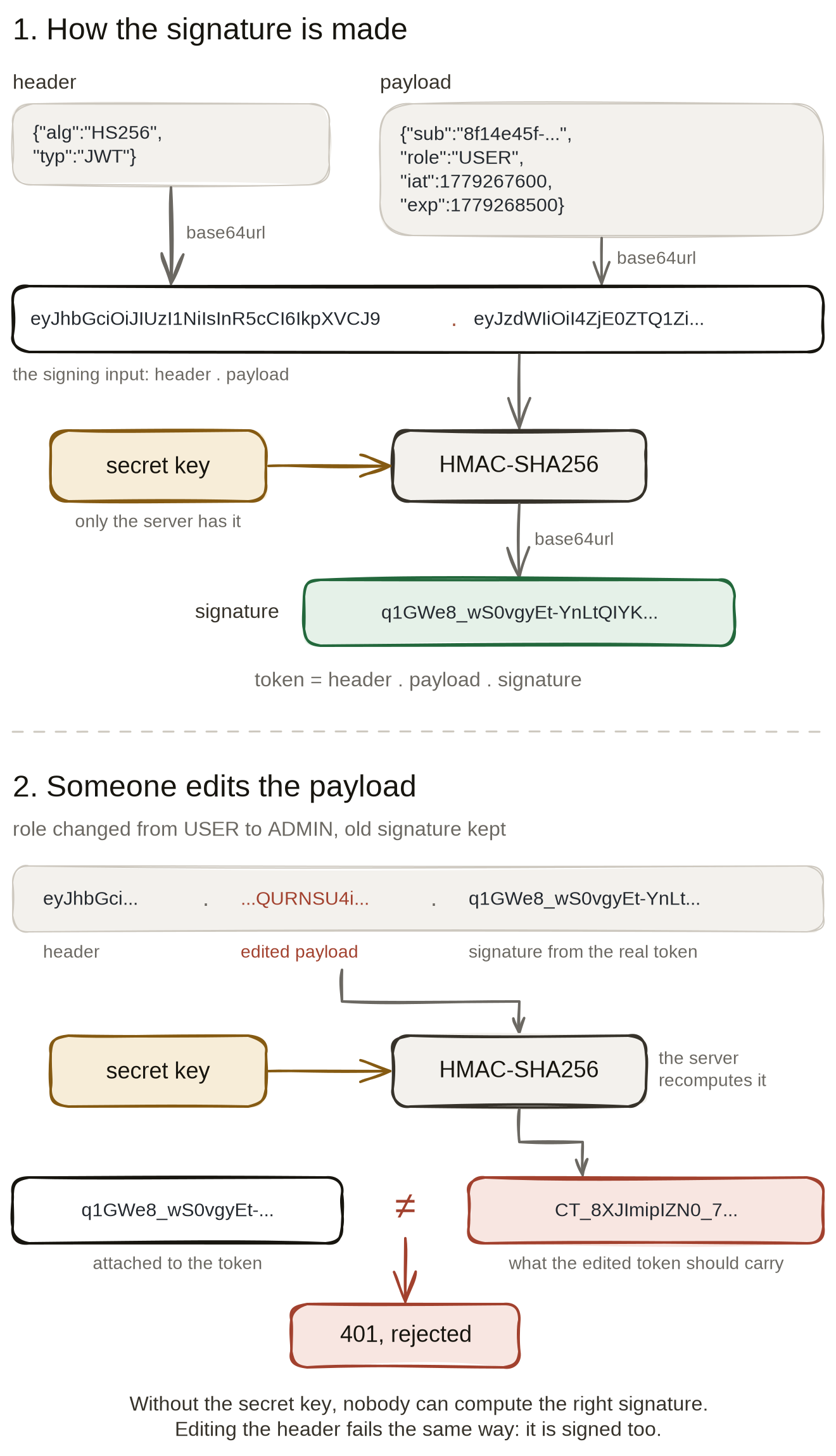
To verify, the server does not decrypt anything. It recomputes the HMAC over the header and payload it received, with its own key, and compares the result with the signature attached to the token:
- Edit the payload - say
"role": "USER"becomes"ADMIN"- and the signing input changes, so the correct signature changes with it. The attached one no longer matches. - Edit the header and the same thing happens: the header is part of the signing input too.
- Re-sign the edited token and you need the secret key, which never leaves the server.
The one way around this is a verifier that lets the token's header choose the algorithm - see algorithm confusion. With a key pair (RS256), the shape is the same: the private key produces the signature and the public key checks it, so a verifier can check a token but never sign one.
Example: a real token, decoded
This is a real HS256 token, signed with the demo secret demo-secret-for-this-post-only. Paste it into a JWT debugger with that secret and the signature checks out. It is split at the dots here for reading; the real token is one line.
eyJhbGciOiJIUzI1NiIsInR5cCI6IkpXVCJ9
.eyJzdWIiOiI4ZjE0ZTQ1Zi1jZWVhLTRlN2EtOWIxYy0yZDZjMWYwZTdhMzEiLCJyb2xlIjoiVVNFUiIsImlhdCI6MTc3OTI2NzYwMCwiZXhwIjoxNzc5MjY4NTAwfQ
.q1GWe8_wS0vgyEt-YnLtQIYK32OOfyeF5w4d-UN0_oU
The first segment decodes to the header:
{
  "alg": "HS256", // HMAC with SHA-256, using a shared secret
  "typ": "JWT" // the token type
}
The second decodes to the payload:
{
  "sub": "8f14e45f-ceea-4e7a-9b1c-2d6c1f0e7a31", // the user ID
  "role": "USER", // a custom claim
  "iat": 1779267600, // issued at: 2026-05-20 09:00:00 UTC
  "exp": 1779268500 // expires at: 09:15:00 UTC, 15 minutes later
}
The third segment, q1GWe8_wS0vgyEt-YnLtQIYK32OOfyeF5w4d-UN0_oU, does not decode to anything readable. It is the 32-byte HMAC output, base64url-encoded.
Now the tampered copy from the diagram. With role set to ADMIN, the second segment becomes ...LCJyb2xlIjoiQURNSU4iLCJp..., but the attached signature is still q1GWe8_w.... The correct signature for the edited payload is CT_8XJImipIZN0_7tCXz2PTsAJ4C6AfOKklaof-YjpE, and only someone holding the secret can compute it.
Notice that everything above was readable without the secret. A JWT payload is public: never put anything in it you would not show the user.
What Goes in the Payload
When a user logs in, the server signs a token with these claims:
Other Claims Worth Knowing
With one API and one frontend, the four claims above are enough. A system with several clients or several services usually needs a few more:
sub, aud, iss, exp, iat and jti are registered claims in the JWT spec (RFC 7519). sid is a common convention borrowed from OpenID Connect.
How the Backend Verifies It
Verification has three parts:
- Check the signature with the expected algorithm and key. The verifier decides which algorithm it accepts; the token's header does not. A tampered payload produces a mismatched signature and is rejected immediately.
- Check
exp. If the current time is past the expiry, the token is dead regardless of the signature. - Check the context claims you use, such as
audandiss.
Ending a session early covers when one lookup per request is worth adding back.
What the Claims Are Used For
Once verified, the claims drive two things on every protected request:
subscopes the data. It becomes theuserIdfor every database query, so a user with a valid token can only ever reach their own records. The scoping happens at the service layer on every query, not just at the route level.rolegates access. A roles guard checks it on privileged endpoints. A user with a valid token but the wrong role is still blocked: authentication (who are you?) and authorization (are you allowed?) are separate checks.
Roles in the Token, or in the Database?
Putting the role in the token saves a lookup, but it freezes the role at login time. If a user loses a role, their token keeps claiming it until it expires.
How to choose:
- Keep roles in the token when they rarely change and a change can wait up to 15 minutes, until the token expires.
- Read roles from the database when permissions change often, or when losing access must be immediate. The token then carries identity only.
- Check what you already load. Many APIs read the user row on every request anyway, and then the database option costs almost nothing.
401 or 403?
The two refusals mean different things, and clients act on the difference:
401 Unauthorizedmeans "I do not know who you are": the token is missing, invalid, expired, or no longer accepted. The client should refresh or send the user to log in.403 Forbiddenmeans "I know who you are, and you are not allowed". Logging in again will not help.
Keep that line sharp. If a failed role check returns 401, a client that logs out on 401 will throw out a perfectly good session.
Part 2 of 4
Signing, and ending a token early
In short
- With a key pair, other services can verify tokens but never forge them.
- Fix the algorithm per key in server config; never let the token's header choose it.
- A JWT cannot be revoked on its own. A per-user cut-off time or an account check gives the server that power back.
Signing: A Shared Secret or a Key Pair
There are two families of JWT signing algorithms, and the choice decides who can create tokens.
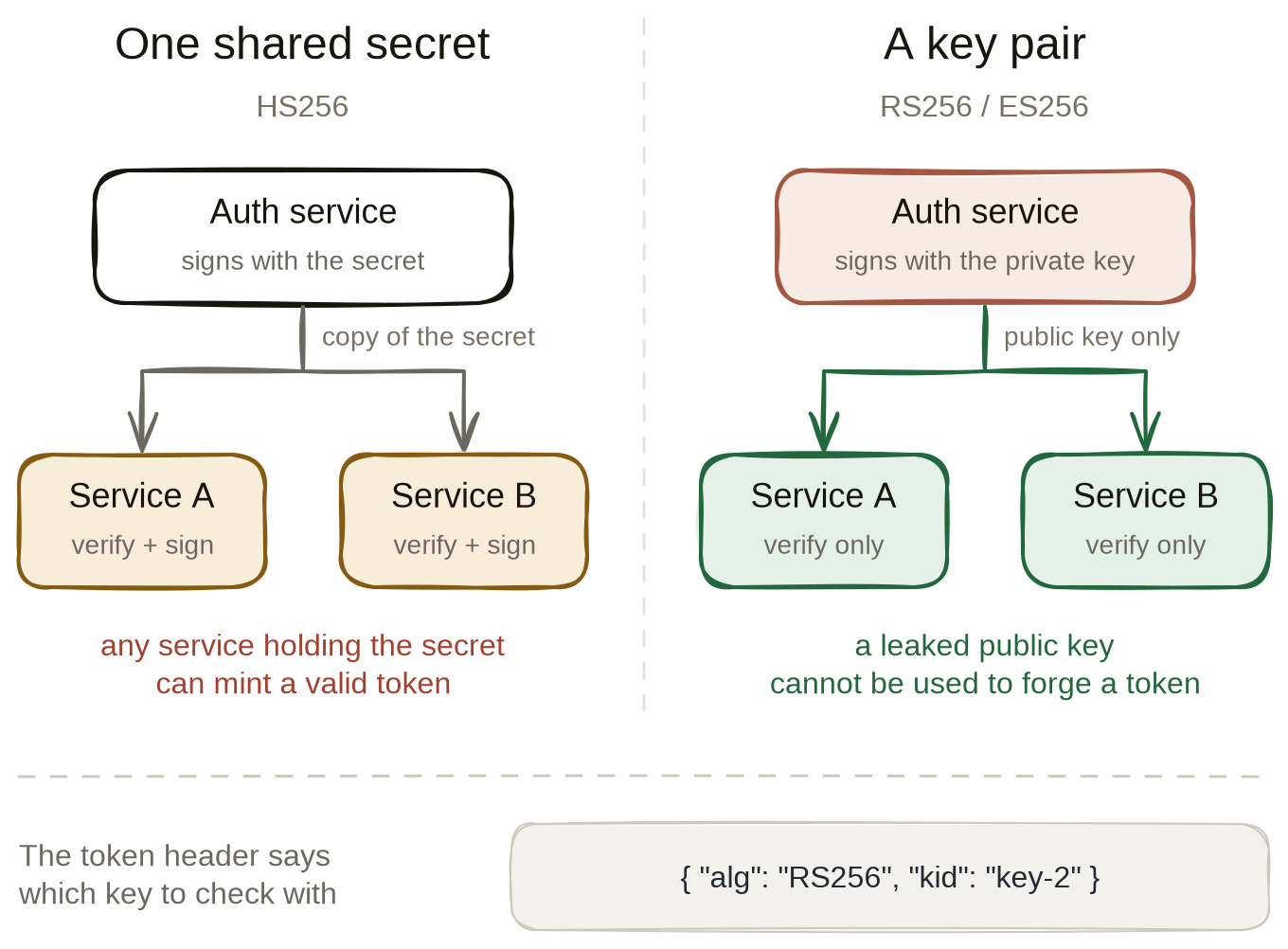
- Symmetric (
HS256) - one secret both signs and verifies. Simple and fast, and fine when the service that issues tokens is the only one that checks them. But every service that verifies a token holds the secret, so every one of them could also forge one. - Asymmetric (
RS256,ES256) - a private key signs, and a public key verifies. Only the auth service holds the private key. Other services get the public key, which is safe to hand out: it can check a token but never create one.
Wherever the private key or secret lives, keep it in a secrets manager rather than a config file, and make the service refuse to start without it.
Key IDs and Rotation
Keys need replacing from time to time, and tokens signed with the old key are still in circulation when you do. The kid (key ID) header handles this:
- Each token names the key that signed it.
- Verifiers keep a small set of trusted public keys and pick the right one by
kid. Many systems publish this set as a JWKS (JSON Web Key Set) endpoint. - During a rotation the old and new keys are both trusted. Once tokens signed with the old key have expired, it is dropped.
Algorithm Confusion
The alg header is written by whoever made the token - including an attacker. If a verifier lets the header choose the algorithm, the attack takes three steps:
- The attacker takes the server's public key, which is not a secret.
- They use it as an
HS256secret and sign a forged token with"alg": "HS256". - A careless verifier sees
HS256, uses "its key" (the public key) as the secret, and the signature checks out.
The defence is to never let the token choose: each key is used with exactly one algorithm, fixed in server configuration. Most JWT libraries take an explicit list of allowed algorithms - always pass it.
Changing the Algorithm Without Logging Everyone Out
Switching from HS256 to RS256 the simple way invalidates every token in circulation at once, which logs out every user. The safer pattern runs two verifiers side by side for a while:
- New tokens are signed only with the new algorithm and key.
- The verifier tries the new algorithm first, then the old one - each locked to its own key, so the transition does not reopen algorithm confusion.
- Once the old tokens have expired, the old verifier is removed.
Services that only verify tokens must accept both kinds before the issuer starts signing with the new one.
Ending a Session Before the Token Expires
Why Access Tokens Are Short Lived
A plain JWT cannot be invalidated after it is issued. The server keeps no record of it, so it will keep working until the exp claim passes. If a token is stolen, the attacker has access for whatever remains of its lifetime - 15 minutes limits that window to something manageable.
But 15 minutes also means the user would need to log in every 15 minutes. That is where the refresh token comes in.
When Waiting for Expiry Is Not Enough
Logout, a banned account or a changed password should take effect now, not when the token happens to expire. There are a few standard ways to give the server that power back, each trading a little of the "no database" property for control:
The last two combine well: if the user row is already loaded for the request, checking its status and a cut-off timestamp needs no extra query. Refresh tokens are simpler: they live in the database, so revoking one means updating its row.
Part 3 of 4
Refresh tokens: rotation and reuse detection
In short
- Refresh tokens are random strings stored only as hashes, so a database leak gives no working tokens.
- Every refresh uses the token up. A token that comes back a second time is a copy.
- On reuse, end the session: the thief's new token is revoked with it.
The Core Problem
A user logs in. The server issues two things: a short-lived access token (15 minutes) and a longer-lived refresh token (7 days). When the access token expires, the client uses the refresh token to get a new pair silently - no login prompt required.
This works in the normal case. But what happens when the refresh token is leaked?
Common leak scenarios:
- The device is compromised by malware
- A database is breached and tokens are exposed
- Traffic is intercepted on an insecure connection
What happens next depends on the server:
- It accepts the token as long as it is valid: the attacker has 7 days of access, and nothing detects it.
- It rotates on every use but does not detect reuse: the attacker can race the legitimate user, and the server cannot tell the difference.
Rotation without detection is not enough. A rotated token that is never checked for reuse gives the attacker a full replacement token pair on first use, with nothing to stop them from continuing.
Why Short Lived Access Tokens Alone Are Not Enough
Short-lived JWTs are a good start. A leaked access token expires in 15 minutes. But the refresh token backing it has a much longer window.
If a refresh token is stolen and the server has no rotation or detection:
- The attacker can refresh indefinitely for the full 7-day window.
- The legitimate user has no way to know their session is compromised.
- The server has no signal that anything is wrong.
The access token lifetime limits how long a leaked access token can be used. The refresh token needs its own protection.
The Rotation and Detection Model
The practical model has three rules:
- Every refresh token use issues a new refresh token and invalidates the old one.
- A rotated token that arrives again is a signal that something is wrong.
- When reuse is detected, the affected session is ended immediately - in the simplest version, every session the user has.
Rule one makes every token single-use. Rule two creates the detection mechanism. Rule three is the response.
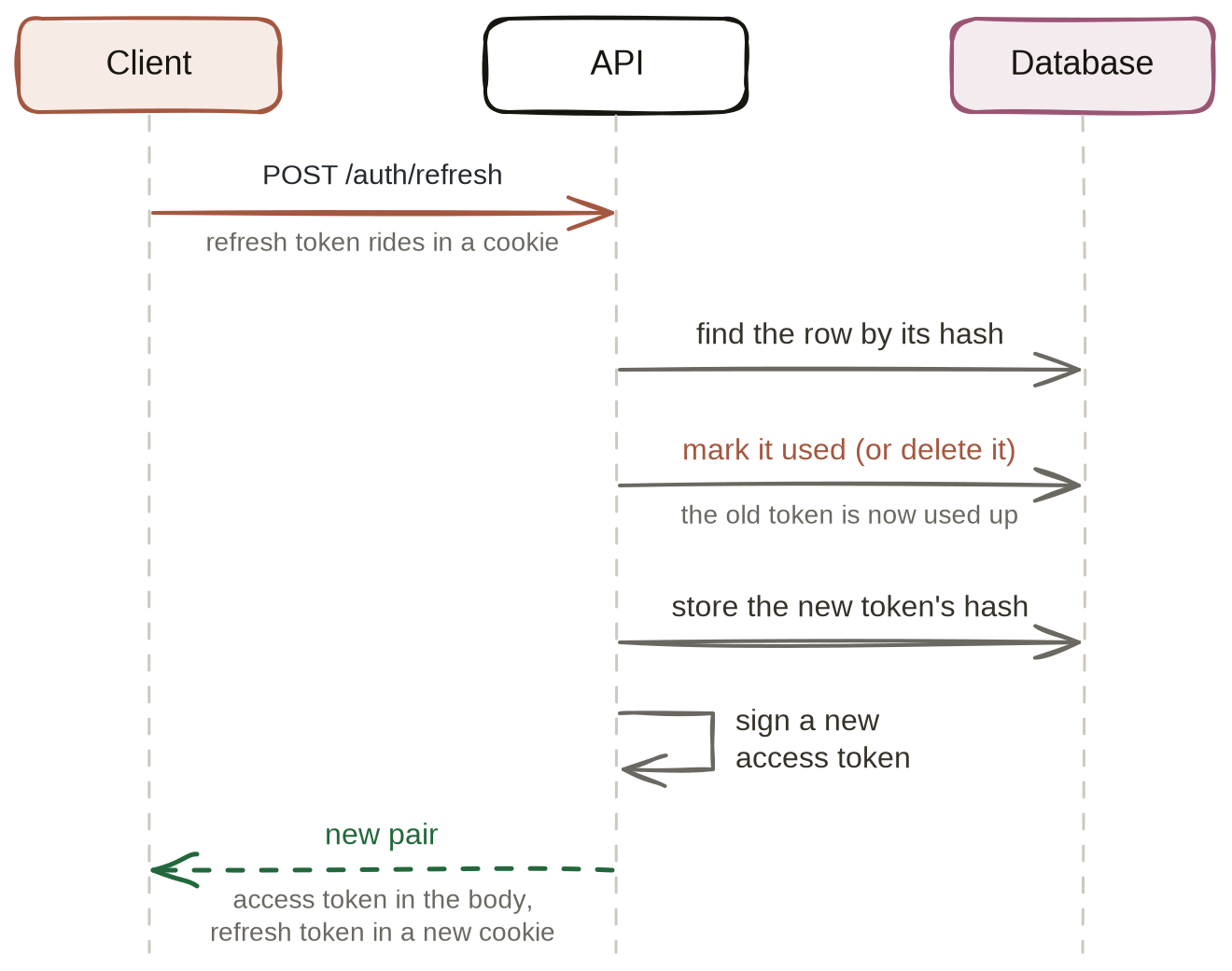
Normal Refresh Flow
1. Store Refresh Tokens as Hashes, Not Plain Strings
A refresh token should never be stored in plain text. If the database is breached, plain tokens give the attacker immediate access to every active session.
The safer approach is to store only a hash of the token and return the raw value to the client exactly once, at the moment of issuance. This example uses bcrypt:
An opaque random string is used instead of a JWT for one reason: a JWT is self-contained and cannot be invalidated without a deny-list. An opaque token tied to a database row is gone the moment the row is revoked or deleted.
bcrypt or a Fast Hash?
bcrypt is built for passwords, and a refresh token is not a password:
- Passwords are short and guessable, so
bcryptis deliberately slow: it makes brute-forcing a leaked hash expensive. - A refresh token is 64 random bytes that cannot be guessed, however fast the hash. So a plain
SHA-256is just as safe here. SHA-256is also deterministic: the same token always produces the same hash, so the server can look the row up directly with a unique index.
bcrypt is still correct, and with one or two sessions per user the difference does not matter (see step 3). With many sessions per user, or no user ID to narrow the search, SHA-256 is the better fit.
2. Rotate on Every Use
When the client sends a refresh token, the server:
- Loads the user's active tokens from the database.
- Finds the one that matches by comparing
bcrypthashes. - Deletes that token.
- Issues a new token pair with a fresh expiry.
The delete happens before the new token is issued. This is intentional - if the issue step fails, the user logs in again rather than ending up with two active tokens for the same session.
3. Find the Matching Token with bcrypt
Because tokens are stored as salted hashes, finding the matching one requires comparing the incoming raw token against each stored hash.
This is a linear scan over the user's active sessions. Most users have one or two active sessions, so the cost is low. With a SHA-256 hash, this whole step becomes a single indexed query.
4. Detect Reuse and Wipe All Sessions
If a token arrives and no active match is found, there are two possibilities:
- The token has already been rotated by the legitimate user.
- An attacker used the token first, and now the legitimate user is trying to refresh.
The server cannot tell the difference. The only safe response is to treat both cases as a breach and end the session. The simplest safe version deletes every active session for that user immediately.
This is the strictest response. A legitimate user who triggers this (for example, a buggy client that retries a refresh request) will have to log in again. For a small app that is an acceptable tradeoff - the alternative is leaving stolen sessions open. The next sections cover how a larger system ends fewer sessions on reuse and raises fewer false alarms.
Token Theft and Reuse Detection Flow
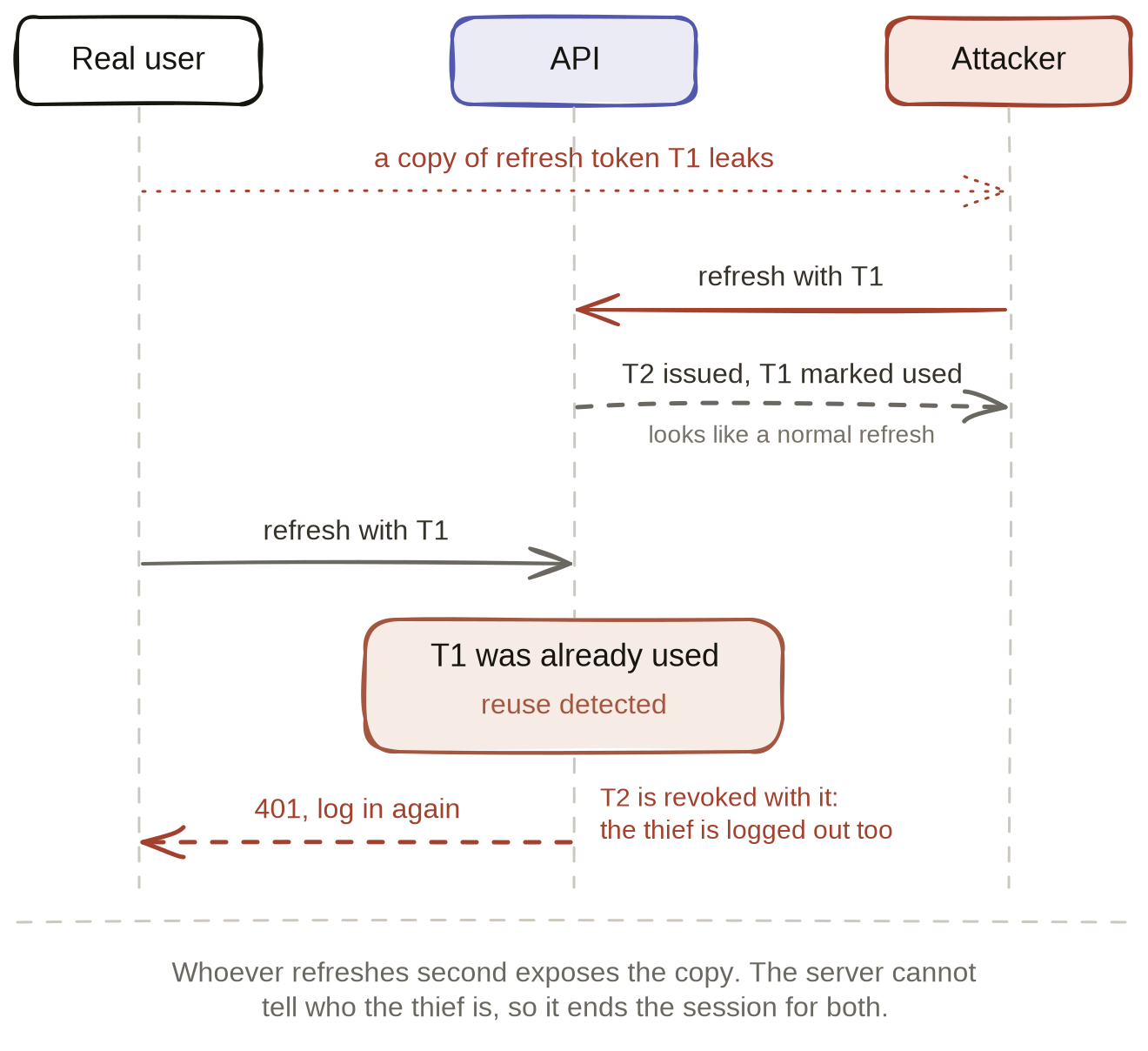
The attacker gets one token pair. The moment the legitimate user tries to refresh, the system detects the reuse and ends the session. The attacker's new token is also now gone.
5. Deliver Tokens via HTTP-only Cookies
Where the refresh token lives decides who can read it:
- In JavaScript - memory,
localStorageorsessionStorage- any script running on the page can read it. - In an
HTTP-onlycookie, JavaScript cannot read it at all. The browser sends it automatically on every matching request and never exposes it to the page.
So an injected script cannot steal the refresh token:
- The access token can still be read from memory by an injected script, but it expires within 15 minutes.
- The refresh token stays out of reach.
- The cookie's
Path, set to the auth routes, keeps it from being sent with every other API request too.
Native Apps Are Different
Cookies are a browser answer. A mobile app has no page for an injected script to run in, and it has secure storage built in (the iOS Keychain, the Android Keystore). So one backend often serves two delivery modes:
- Browsers get the refresh token in an
HTTP-onlycookie. - Native apps get it in the response body and keep it in the platform's secure storage.
Gotcha: cookies on cross-origin requests (withCredentials and CORS)
In a setup where the frontend and API run on different origins, browsers strip cookies from cross-origin requests by default. withCredentials: true on the HTTP client tells the browser to include cookies on cross-origin requests:
The backend must also respond with:
Access-Control-Allow-Credentials: true- an exact
Access-Control-Allow-Originvalue - a wildcard (*) is forbidden when credentials are included.
Without both sides configured, the cookie is silently stripped from every request and the refresh mechanism fails with no useful error.
Gotcha: logout must go through the backend
Because the browser controls HTTP-only cookies completely, the frontend cannot delete the refresh token on logout.
The backend must clear it by responding with a Set-Cookie header that sets Max-Age=0. So logout must always call the backend. A frontend-only logout:
- clears the access token and the indicator cookie,
- but leaves the refresh token in the browser until the server revokes it or it expires.
Part 4 of 4
Hardening for real traffic
In short
- Track one token family per login, so reuse ends one session instead of every device.
- Claim a refresh token with one conditional update, so two concurrent requests cannot both win.
- A reuse within seconds is usually a lost response, not a theft - give it a short grace period.
Token Families: Ending One Session Instead of All
The simple version above deletes used tokens and, on reuse, deletes every token the user has. That is simple and safe, but it has two blind spots:
- A deleted token looks the same as a random invalid one, so the server cannot tell a replay from noise.
- One stolen phone logs the user out of every device.
A token family fixes both:
- Every login gets a session ID (the
sidclaim from earlier). Each rotation creates a new row that shares it, so one login becomes a chain of rows. - Used tokens are marked, not deleted, and each points at the token that replaced it. A token that comes back after being exchanged is now provably a reused token, not just an unknown one.
- Reuse revokes the family, not the whole account. The stolen session ends for both the thief and the user; the user's other devices keep working.
- Logout revokes one family, and "log out everywhere" revokes all of them.
Recording why each row was revoked - rotated, logged out, reuse detected, account banned - costs one column and turns "why was I logged out?" into a single query.
The used rows are what make detection work, so keep them until they expire. Cleaning them up early quietly switches reuse detection off.
Retries and Races
Rotation makes every refresh token single-use. Real networks and real clients do not always cooperate with that, and two normal situations look exactly like theft.
Two Refreshes at the Same Moment
Two browser tabs, or a screen that fires two requests at once, can send the same refresh token twice within milliseconds. If rotation is written as "read the row, check it, then update it", both requests can read the row before either updates it:
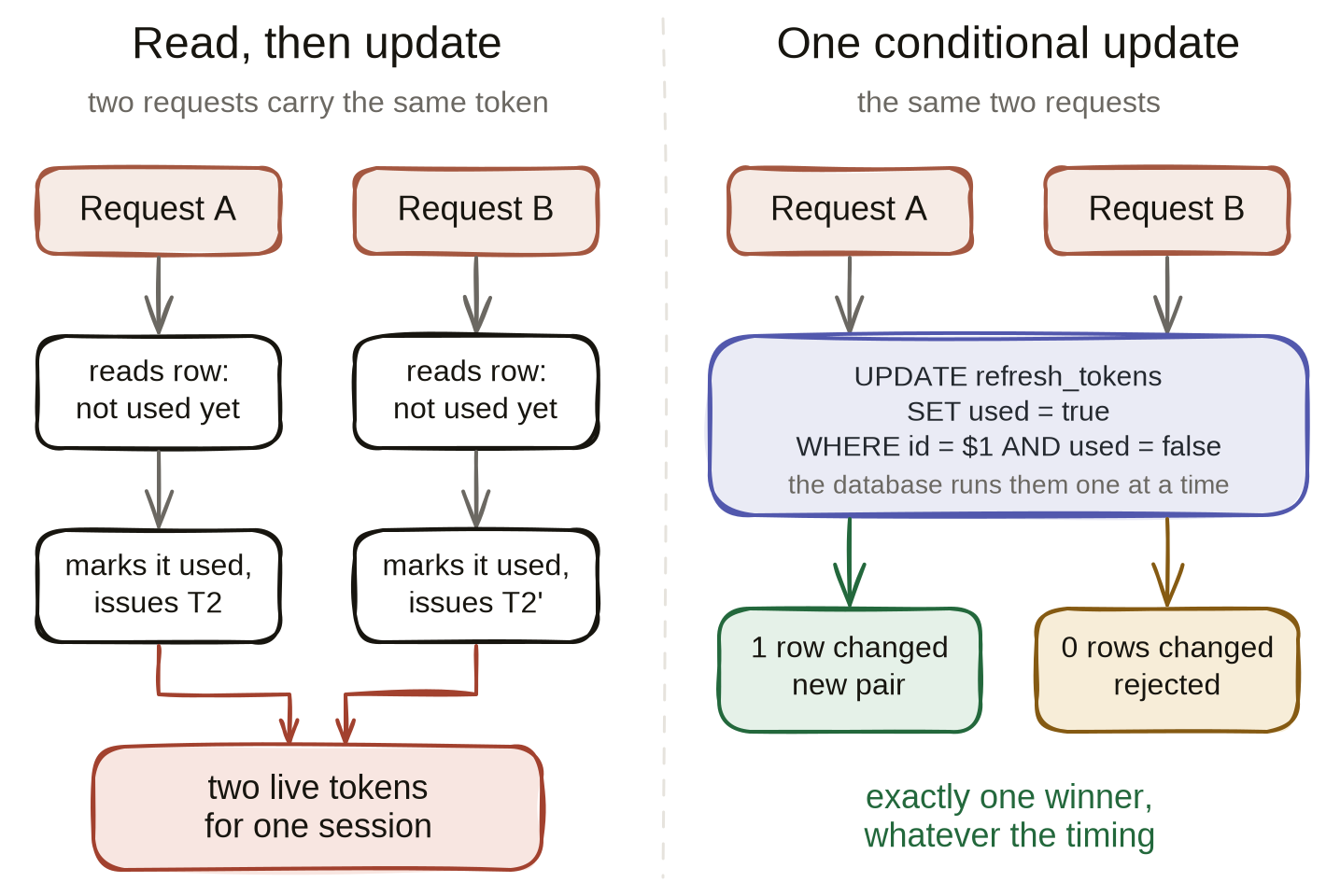
The fix is to make the check and the update one atomic step:
UPDATE refresh_tokens
SET used = true
WHERE id = $1 AND used = false;
-- 1 row changed: this request won and issues the new pair
-- 0 rows changed: another request got there first
Only one request can flip used from false to true. The loser can be refused with a plain 401 and retry with the token its client now holds - it should not be treated as theft.
A Response That Never Arrived
The server rotates the token, but the response is lost - a dropped mobile connection, a timeout. The client never received the new token, so it retries with the old one. To the server, that is the same token arriving twice: reuse.
The difference is timing. A lost-response retry arrives within seconds; an attacker needs far longer to steal a token and use it. So a common answer (Auth0 calls it a "reuse interval") is a short grace period: a token used only seconds ago is treated as a retry, not a theft. During that window the server can either:
- hand back the token it already issued, which means keeping it somewhere it can be read again, or
- issue a fresh pair from the replacement.
Outside the window, reuse detection applies as normal.
On the client side, the best defence is to never send two refreshes at once: one refresh in flight, and every other request waits for its result.
Putting the Flow Together
A complete session lifecycle in the simple version, before the hardening in Part 4:
- User logs in with email and password.
- Server validates credentials and issues a raw refresh token and a signed JWT access token.
- Refresh token is hashed with
bcryptand stored in the database with a 7-day expiry. - Raw refresh token is set as an
HTTP-onlycookie. Access token is returned in the response body. - Client stores the access token in memory and attaches it to API requests.
- Access token expires after 15 minutes.
- Client sends the refresh token cookie to the refresh endpoint.
- Server finds the matching hash, deletes that token, and issues a new pair.
- Fresh 7-day window begins. Old token is gone.
- If the incoming token matches no active token, all sessions are deleted and the user must log in again.
Practical Tradeoffs
- Shared secret vs key pair - a shared secret is simpler with one service; a key pair is worth it as soon as a second service verifies tokens.
- Roles in the token vs the database - a lookup per request buys permission changes that apply immediately.
- Rotation vs retry safety - rotation makes tokens single-use, so concurrent refreshes and lost responses look like reuse unless the update is atomic and retries get a short grace period.
bcryptvsSHA-256-bcryptis safe but needs a scan; for long random tokens,SHA-256is equally safe and allows an indexed lookup.HTTP-onlycookies and CORS - protect against XSS but requireCORSandSameSiteconfiguration to work correctly across different frontend and API origins.- Full wipe vs token family - wiping every session on reuse is the simplest safe default. Revoking only the affected family keeps the user's other devices signed in, at the cost of tracking a session ID per login.
How Far to Go
The simple version is a sound default: a short-lived JWT access token, an opaque refresh token stored as a hash, rotated on every use and kept in an HTTP-only cookie, and a full wipe of the user's sessions on reuse.
It rests on one distinction: the access token is a JWT, but the refresh token is not. A JWT cannot be invalidated without extra state on the server, while an opaque token tied to a database row is gone the moment the row is revoked.
The heavier pieces earn their place as the system grows:
For all four applied to a real production backend - including moving to a new algorithm and token format without logging anyone out - see Session management, part 1: sessions the backend can trust and end.