
The problem
MO Marketplace has two internal admin panels, one for staging and one for production, used by marketing, sales, support and engineering. They were React single-page apps hosted on Firebase Hosting, and anyone on the internet could open their login page. The only thing between a stranger and the admin UI was a password form.
Three other things made this worse than it looked:
- There was no way to add a gate in place. Google's sign-in gate for web apps, Identity-Aware Proxy (IAP), is a setting on a Google Cloud load balancer. Firebase Hosting serves sites from Google's shared edge, which you cannot put a load balancer in front of, and it always keeps the
*.web.appand*.firebaseapp.comaddresses open as side doors. - Deploys used a long-lived key. GitHub Actions deployed both panels with a service account key stored as a repository secret.
- The panels lived in a separate Google Cloud project, apart from everything else the platform runs.
Checking what the move would break
Before choosing anything, I checked four things that could have made the move much harder:
Nothing blocked the move, so the plan became: serve the built app from Cloud Run, put a load balancer with IAP in front of it, and deploy it from Cloud Build.
The setup after the move
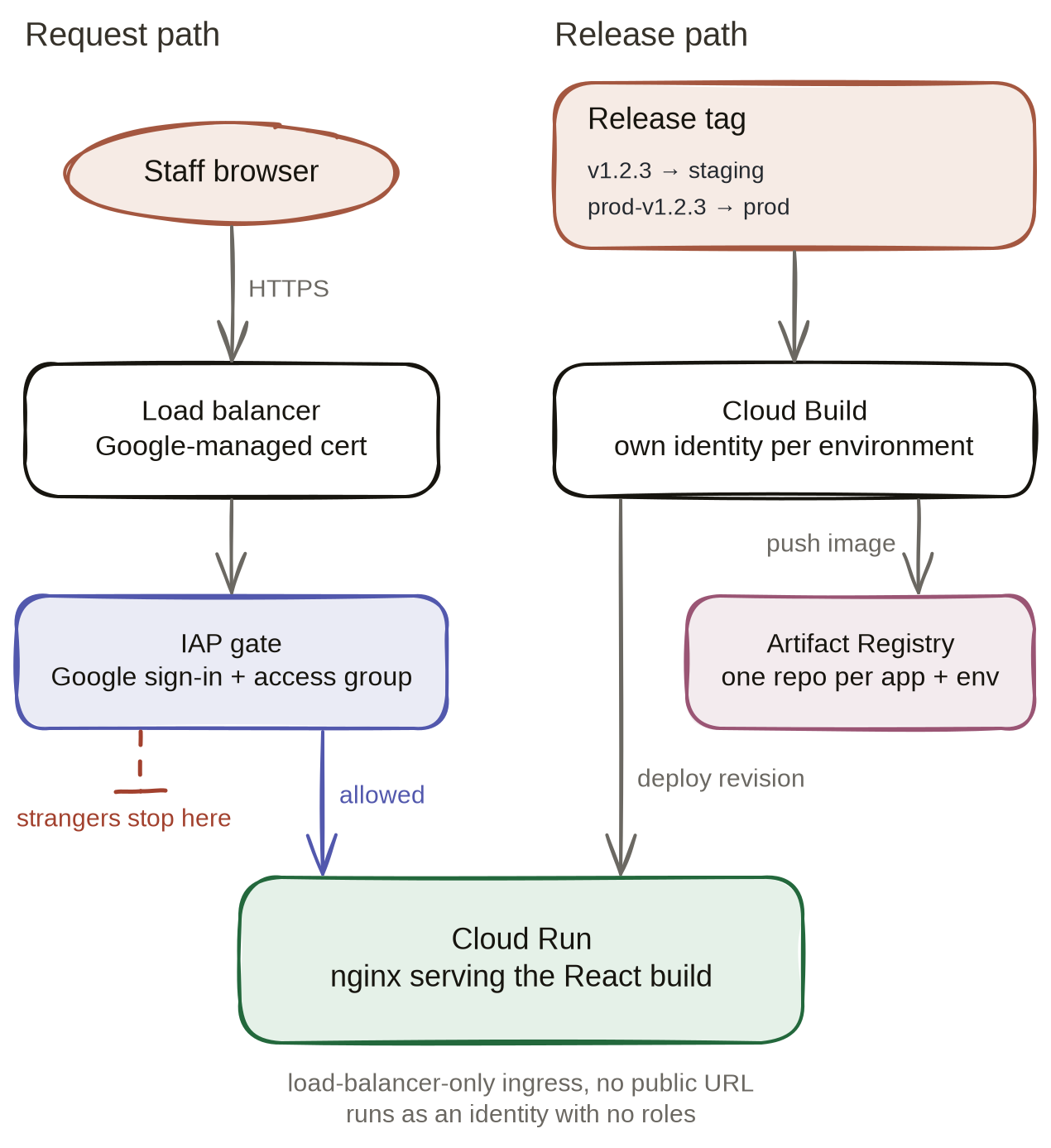
The backend API the panels call did not change. What changed is where the panels are built and deployed from, where their files are served from, and who is allowed to load them.
Decision 1: which load balancer
IAP needs a load balancer, and there were four reasonable layouts. A load balancer here means a forwarding rule, an HTTPS proxy and a URL map; different hostnames can route to different backends.
The project already had more than five global forwarding rules, so each new one is billed at about $7.30 a month. Option C cost the same as D but kept production completely separate:
- Production shares nothing with staging or the analytics tool, so a mistake elsewhere cannot take it down.
- Staging is where risky changes go first - TLS policies, headers, new host rules - and under C those tests never touch production.
- The staging proxy already used a certificate map, so adding a hostname needed one new entry, not a rebuild.
Its one cost was a careful edit of a live URL map, covered below.
Decision 2: identities that can do one job each
Instead of a broad default service account, each environment got two identities of its own:
- Runtime identity - what the container runs as. nginx only serves files and never calls a Google API, so this account has no roles at all.
- Build identity - what Cloud Build runs as. Each of its grants sits on a single resource rather than the whole project, except writing logs, which cannot be scoped smaller. The diagram in Decision 4 shows every grant at the step that uses it.
One of those grants matters more than it looks. A Cloud Run service can do whatever its service account can, so choosing the account is itself a permission (iam.serviceAccountUser, often called actAs). Granting it on one specific account, not the project, means a build that is compromised cannot deploy code running as a more powerful identity.
The deploy role has one gap: it can change a service's ingress setting. That is covered by the pipeline, which re-applies every lock on each deploy (below), so a manual change is reverted at the next release.
Decision 3: one image repository per app and environment
The staging admin panel and the production admin panel each get an image repository of their own, instead of sharing one with the project's other apps. That brings four benefits:
- Write access limited to one repository. Each environment's Cloud Build service account can push only to its own repository, so it cannot overwrite any other app's images.
- Clear ownership. The repository name says whose images are inside.
- A clean-up rule for this app alone. It keeps the newest 10 images, so a rollback always has an image to go back to.
- Easy removal. Retiring the app later means deleting one repository.
Decision 4: every deploy starts from a tag
I set up release-please on the develop branch to cut versioned releases, and made those version tags the starting point of every deploy:
- Staging deploys when release-please creates a
vX.Y.Ztag. - Production deploys from a
prod-vX.Y.Ztag, created by a small workflow whendevelopis merged intomain.
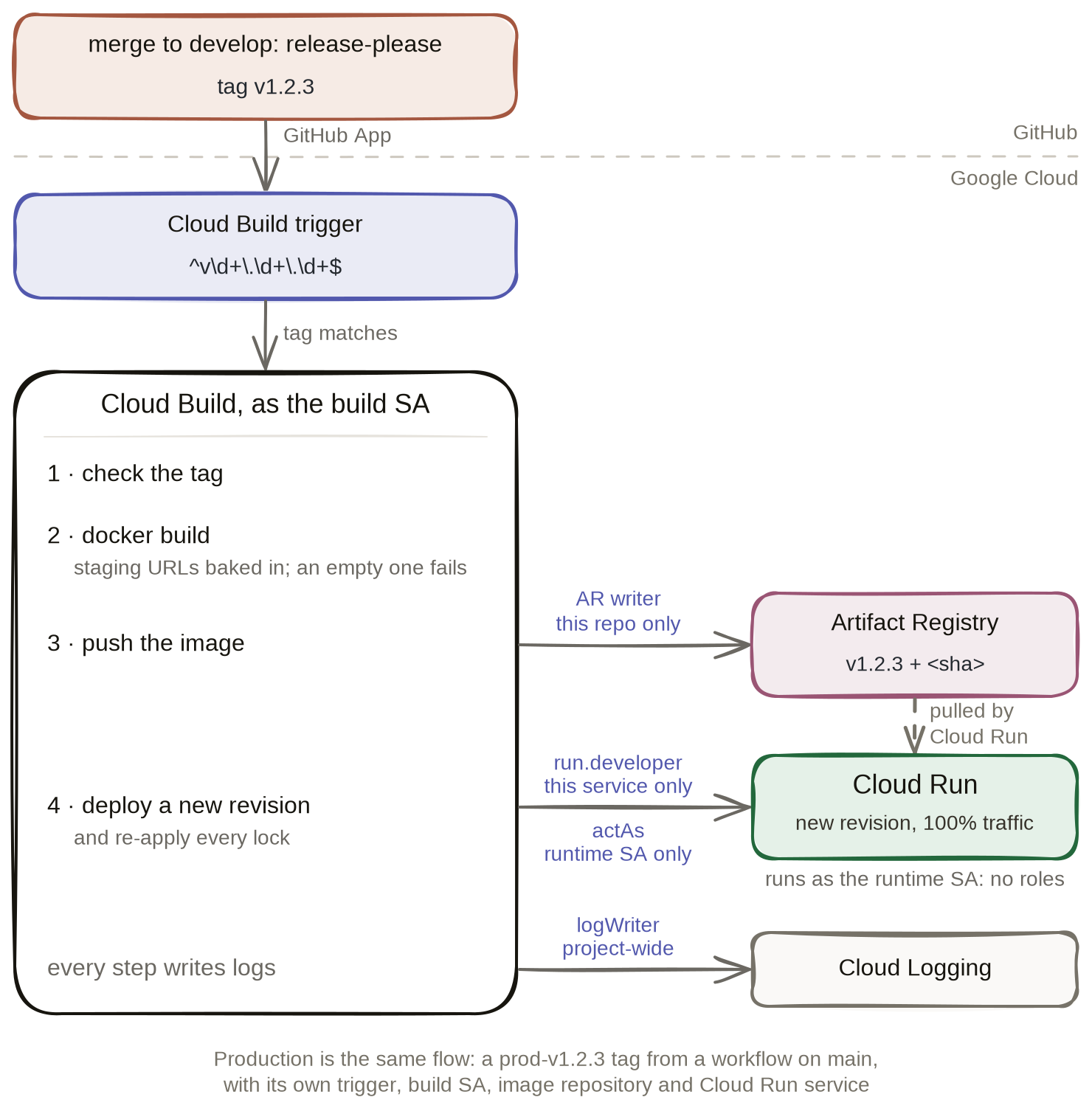
The trigger patterns, ^v\d+\.\d+\.\d+$ and ^prod-v\d+\.\d+\.\d+$, cannot overlap because ^ anchors the start. A merge to main with no new version finds its prod-v tag already there and deploys nothing. Each production deploy leaves a tag behind: a record of what shipped when, and a point to roll back to.
The React build bakes its API URLs in at build time, so each environment needs its own image. The two build files - one per environment - live in git and are reviewed in pull requests, rather than as trigger settings in the console where nobody reviews a change.
Every deploy also re-applies the service's locks, so the settings live in git and drift fixes itself on the next release:
gcloud run deploy "$_SERVICE" \
  --image="$IMAGE" \
  --service-account="$_RUNTIME_SA" \
  --ingress=internal-and-cloud-load-balancing \
  --no-allow-unauthenticated \
  --no-default-url \
  --port=8080 --cpu=1 --memory=512Mi \
  --min-instances=0 --max-instances="$_MAX_INSTANCES"
Three locks, not one
A single page load passes three independent checks:
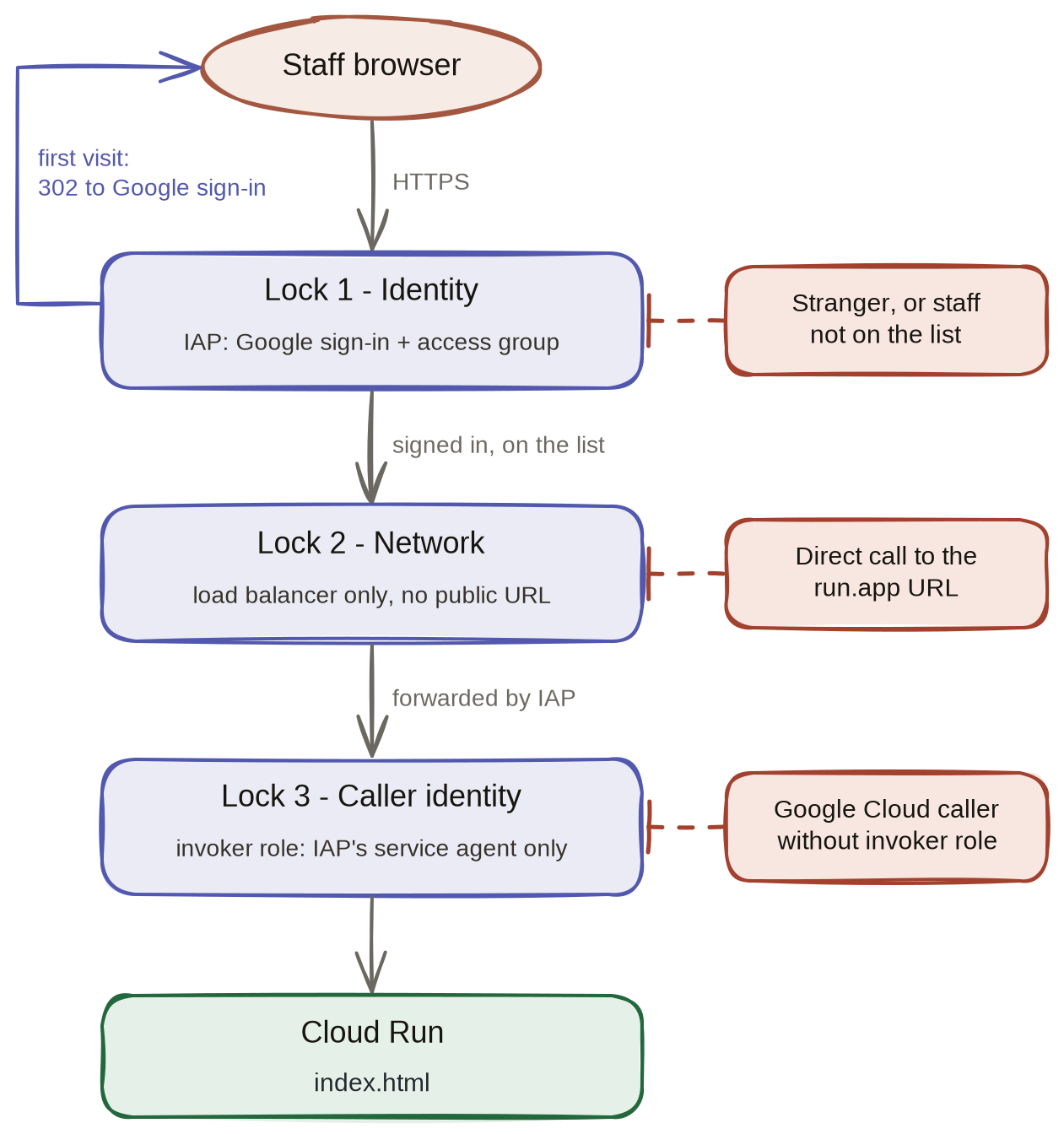
Any one lock would stop a stranger. Together, one mistake - IAP switched off, or a public URL re-enabled - still leaves the panels closed.
Access is managed through groups, not individual grants. Each gated app has its own access group, and engineers are kept once in an engineering group nested into each. A new engineer is added in one place; a leaver is removed in one place.
Certificates without touching the live sites
Both panels needed a Google-managed certificate on their new load balancer, issued and working before any DNS record moved. Two details made that more than one command.
One address, two names
Staging's admin hostname joined the load balancer that already served the staging website, so one IP now answers for two names. Every request has its name read twice:
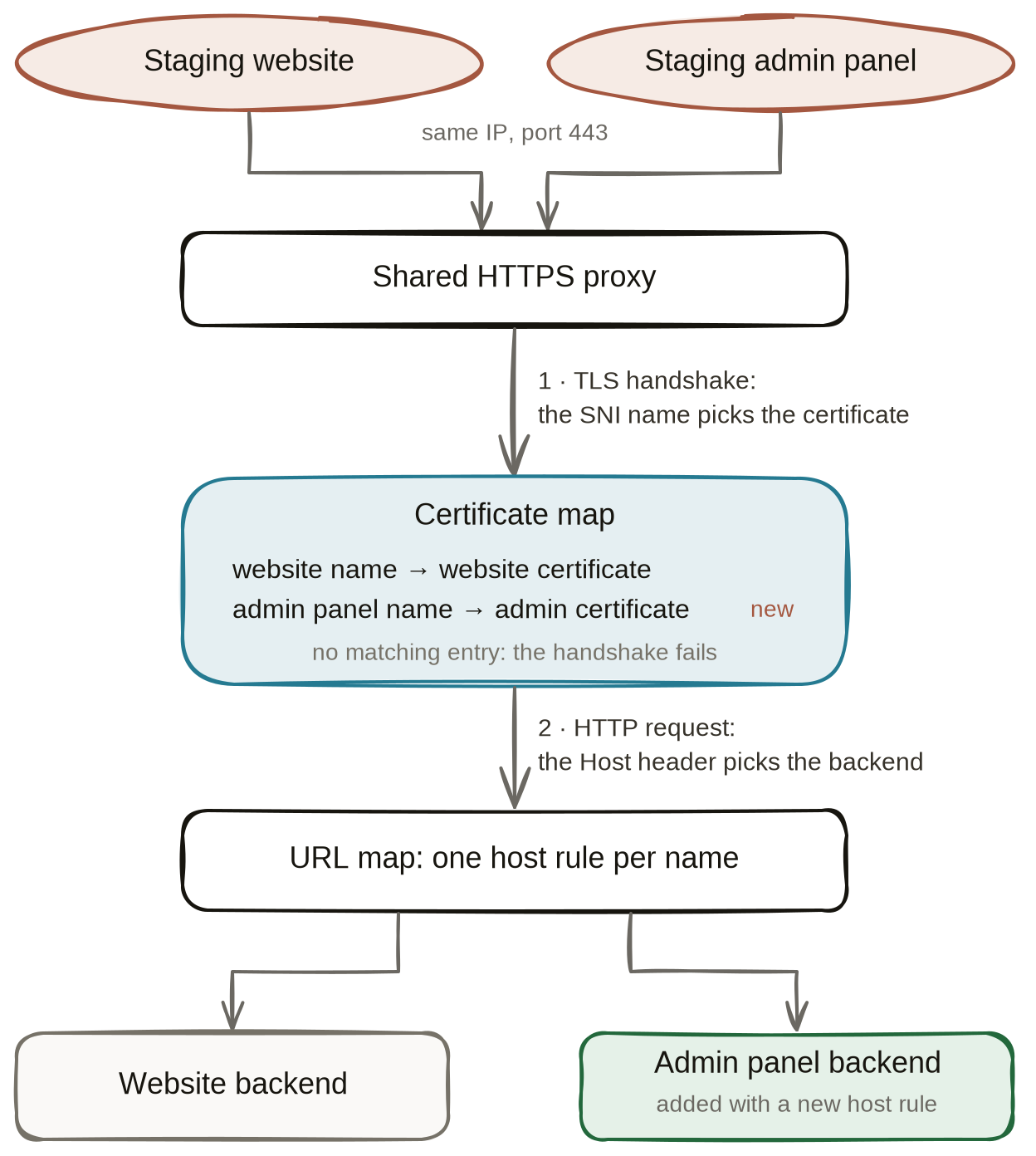
- The certificate is chosen during the TLS handshake. The browser sends the hostname it wants (SNI) before any HTTP happens, and Certificate Manager's certificate map picks the matching certificate. Adding the admin panel meant one new map entry; the forwarding rule, proxy and IP did not change. A name with no entry fails the handshake outright, so a mistake shows up at once rather than as the wrong site.
- The backend is chosen after it. The URL map reads the Host header and sends the request to the right backend, through the host rule added in the live URL map edit described below.
Production has its own load balancer and its own certificate map, so it shares neither with staging.
A DNS name that was already taken
Before issuing a certificate, Certificate Manager needs proof that you control the domain, through a DNS record it tells you to create. Its default type puts that record at _acme-challenge.<host>. Firebase Hosting already had a TXT record at exactly that name for its own certificate, and DNS does not allow a CNAME to share a name with any other record.
That kept the old and new setups independent: Firebase kept serving with its own certificate until the switch, and the new certificates were issued while no user was pointed at them. Before any DNS change, I checked each new load balancer by its IP with openssl s_client -servername <host> to confirm it presented the right certificate for that name.
One rule outlives the move: the per-project CNAMEs stay forever. Google-managed certificates renew through them, and deleting one does not fail on the day - renewals stop quietly and the certificate expires months later. I wrote that into each DNS authorization's description, and Firebase's old TXT records were removed in the clean-up.
Serving a React build properly
The container is a two-stage image: Node builds the app, then only the built files go into a small nginx image that runs as a non-root user on port 8080. Two details I cared about:
- The build fails if an API URL is empty. A
test -ncheck stops the build, so a panel callingundefined/apican never ship. - Caching is split by file type.
no-cache still caches, but checks with the server every time: unchanged costs a cheap 304, changed returns the new index.html that points at new hashed file names. A new release reaches users on their next page load, and the large files are downloaded only once per release.
Switching over without risk
Every part was built beside the live Firebase sites, so users kept working while nothing pointed at the new setup yet. Each test got one step closer to real users and only ran once the one before had passed:
- Local container - cache headers checked with
curlagainst a local Docker run. - Pipeline with test tags - a temporary trigger pattern (
admin-test-*) proved tag-to-revision end to end without using up a real version number. - Load balancer by IP -
curl --resolveagainst the new IP, expecting IAP's 302 redirect, before DNS pointed anywhere. - One browser - a single
/etc/hostsline on one laptop: sign-in, panel login, data loading and deep-link reload all checked through IAP. - DNS, staging first - switched, confirmed by an engineer, then production.
One part needed extra care: the live URL map. Staging's admin hostname had to be added to the load balancer that already served the staging website. I exported the URL map, added the host rule plus built-in routing tests, validated it, then imported it. Those tests stay in the URL map: Google runs them on every later edit and refuses any change that breaks them. The certificates were already active by then, as described above.
Firebase stayed untouched until both environments were confirmed, so rollback was always one step: put the old DNS record back.
Once real users had confirmed both environments, I closed the old path: removed the Firebase deploy workflows from the repository, disabled the Firebase sites so the side-door addresses stopped serving, deleted the GitHub secret and the service account key behind it, and removed Firebase's old DNS records.
Why this mattered
Marketing, sales, support and engineering use the admin panels to run the platform every day. Before this work, the only thing protecting them was a login form open to the whole internet. Now:
- A much smaller attack surface. Nobody reaches the panels without a company Google account on the access list. Password guessing and bugs in the login page are no longer exposed to strangers, because they are stopped at the load balancer.
- No keys to leak. Deploys run as Google Cloud identities, with no stored service account keys anywhere, so there is no long-lived credential that someone could copy and use to deploy.
- Every release is traceable. Each deploy starts from a version tag and a build file reviewed in a pull request. The team can see what shipped and when, and roll back to any earlier tag.
- Access managed in one place. Giving someone access to a panel, or taking it away, is one group change, not a list of separate grants.
- A pattern ready to reuse. A runtime identity with no roles, a build identity per environment, an image repository per app and IAP in front: the next internal tool that needs to be private can follow the same setup.
And the people who use the panels every day kept working throughout the move.