thirana
All projects

Drydock

A networking guide I built: a fundamentals course, a Google Cloud networking course, and Harbour - a GCP platform with 17 network defects planted on purpose, the commands that find them, and the order they have to be fixed in.

Live2026Live
  • Google Cloud
  • VPC
  • Firewall policies
  • IAP
  • Load balancing
  • Cloud NAT

Outcomes

  • Two courses with 61 chapters: 35 on networking fundamentals and 26 on networking in Google Cloud, both following one fictional company and its addresses.
  • 158 interactive widgets and 63 diagrams, so most ideas can be tried by hand: subnet calculators, simulators, byte dumps and quizzes.
  • Harbour, a fictional marketplace on Google Cloud with 17 network defects, each with the command that finds it, the change that closes it and the check that confirms it.
  • A remediation sequence in six phases that lists what blocks each fix, with a map that redraws as each phase is applied.
  • Every defect links to the course sections that teach it, and those chapters link back to the defects.
  • Free and fully static: no account or sign-up, with full-text search and a glossary of 166 terms.

Concepts and strategies

Addressing and routing
subnets, gateways, ARP, NAT and how a router picks a route
Method: One company and one address book in every chapter
Transport and protocols
what TCP, UDP, DNS, HTTP and TLS each add to one request
Hands-on: Interactive widgets in most chapters
GCP network controls
VPCs, routes, firewall rules and policies, IAP, Cloud NAT and private access
Course: 26 chapters on Google Cloud
Load balancing and the edge
the HTTPS load balancer chain, health checks, Cloud Armor and Cloudflare in front
Lab: Harbour defects D8 and D12-D15
Remediation order
which fix blocks which, and why one rule has to be deleted last
Sequence: 6 phases, each with its prerequisites and risk
Verification
a command that finds each defect and a check that confirms the fix
Commands: gcloud, dig, curl, ip route

Drydock

Drydock is a guide to how networks work, in three steps: a networking fundamentals course, a course on networking in Google Cloud, and Harbour - a fictional platform on Google Cloud whose network I misconfigured on purpose. I built it while working through Google Cloud networking end to end. The courses teach the concepts, and Harbour tests them.
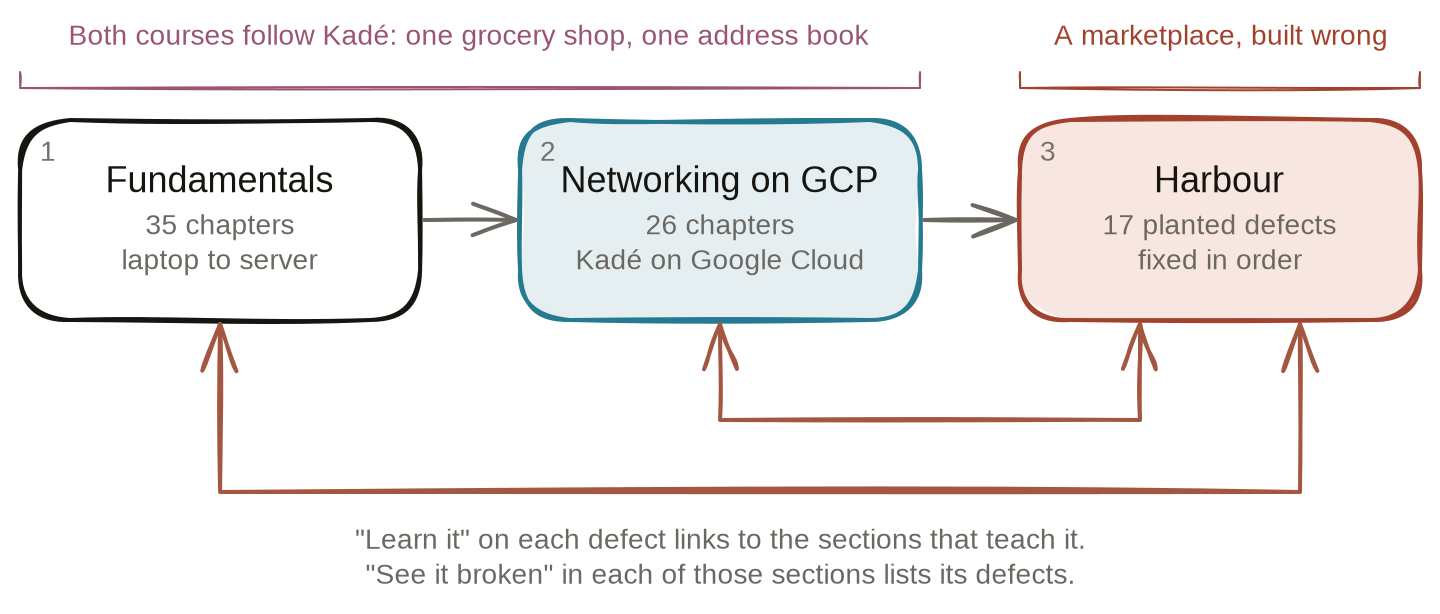
Three steps from left to right. 1: Fundamentals, 35 chapters, from a laptop to a server. 2: Networking on GCP, 26 chapters, Kadé on Google Cloud. Both courses follow Kadé, one grocery shop with one address book. 3: Harbour, a marketplace built wrong, with 17 planted defects fixed in order. Arrows run back from Harbour to both courses: Learn it on each defect links to the sections that teach it, and See it broken in each of those sections lists its defects.
Two courses that teach, and a lab that tests, linked both ways

The two courses

Both courses follow Kadé, a small online grocery shop in Colombo. The reader is its backend engineer. Chapter 0 of each course holds the story, the network map and an address book, and every later chapter uses those same addresses.

  • Fundamentals follows one request from a laptop on home Wi-Fi to a server: addressing, ARP, NAT, routing, TCP and UDP, DNS, HTTP, TLS, and the proxies and load balancers in between.
  • Networking on GCP moves Kadé into Google Cloud: VPCs, firewall rules and policies, IAP, Cloud NAT, private access, Cloud Run, load balancing, Cloud Armor, Cloudflare, hybrid links and governance.

Most chapters have an interactive widget, such as a CIDR calculator, a DNS resolution simulator or a TCP congestion window simulator.

Harbour: a platform built wrong on purpose

Harbour is a fictional marketplace for independent sellers. Four paths keep it running: shoppers loading product pages, checkout charging the card through a payment gateway, a nightly job paying sellers, and a courier reading order status over a private link. Each of its 17 defects started as a reasonable shortcut that nobody revisited, such as SSH opened to the internet so the founders could deploy from anywhere.
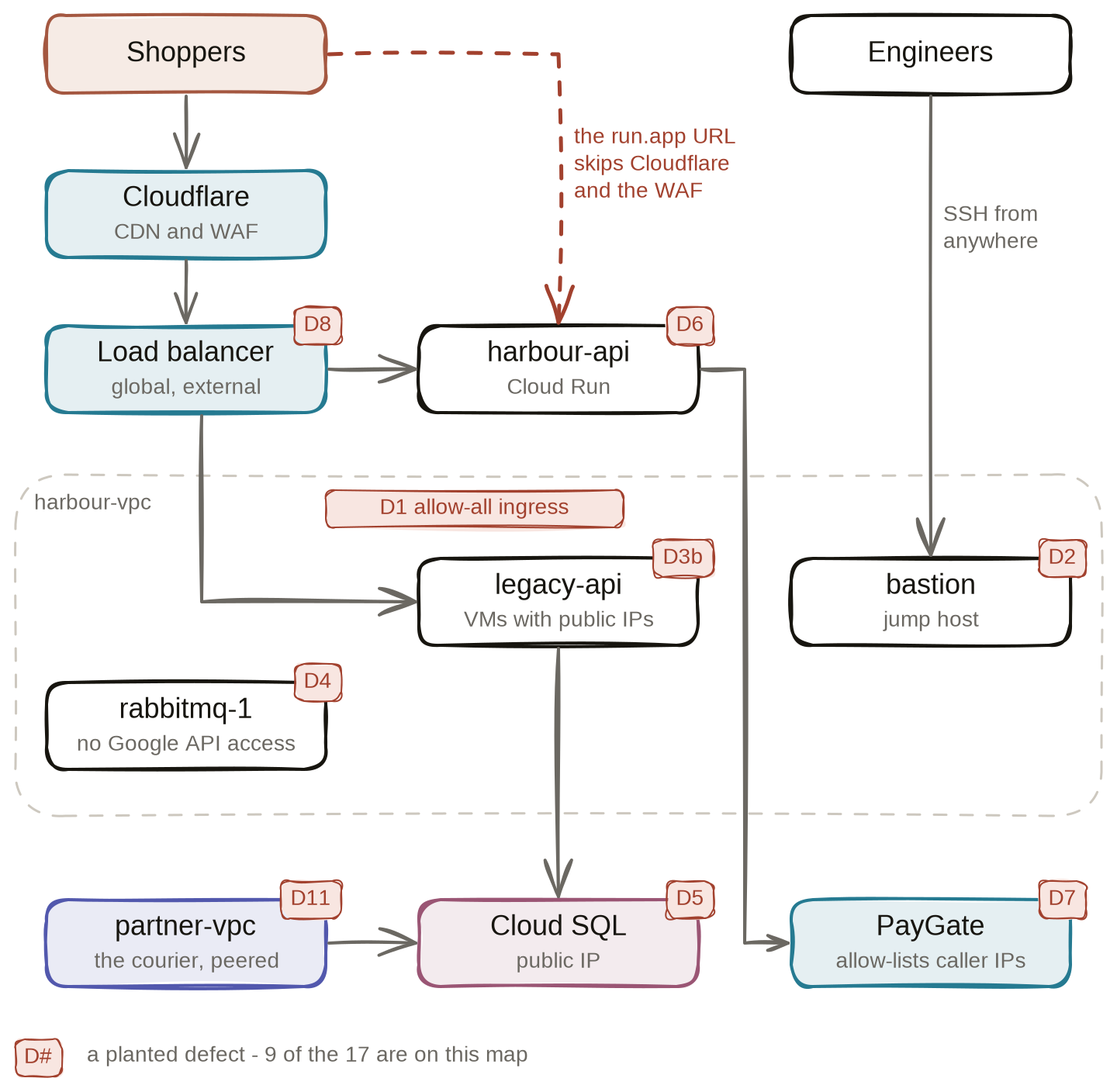
Harbour as found. Shoppers go through Cloudflare and a global external load balancer (D8, the origin is not locked to Cloudflare) to harbour-api on Cloud Run, but a dashed red path shows the run.app URL skipping Cloudflare and the WAF (D6). The load balancer also sends traffic to legacy-api, VMs with public IPs (D3b), inside harbour-vpc, where one rule allows all ingress (D1). Engineers reach the bastion over SSH from anywhere (D2). rabbitmq-1 has no Google API access (D4). legacy-api reaches Cloud SQL on a public IP (D5), partner-vpc is peered to reach it (D11), and harbour-api calls PayGate, which allow-lists caller IPs (D7).
Harbour as found, with 9 of its 17 defects marked

Each defect page has the symptom, the impact, the command that finds it, what blocks the fix, the state before and after, and the change that closes it.

The order of the fixes

A list of 17 findings does not say where to start. Several fixes cannot begin until another one is finished, so Harbour fixes them in six phases:
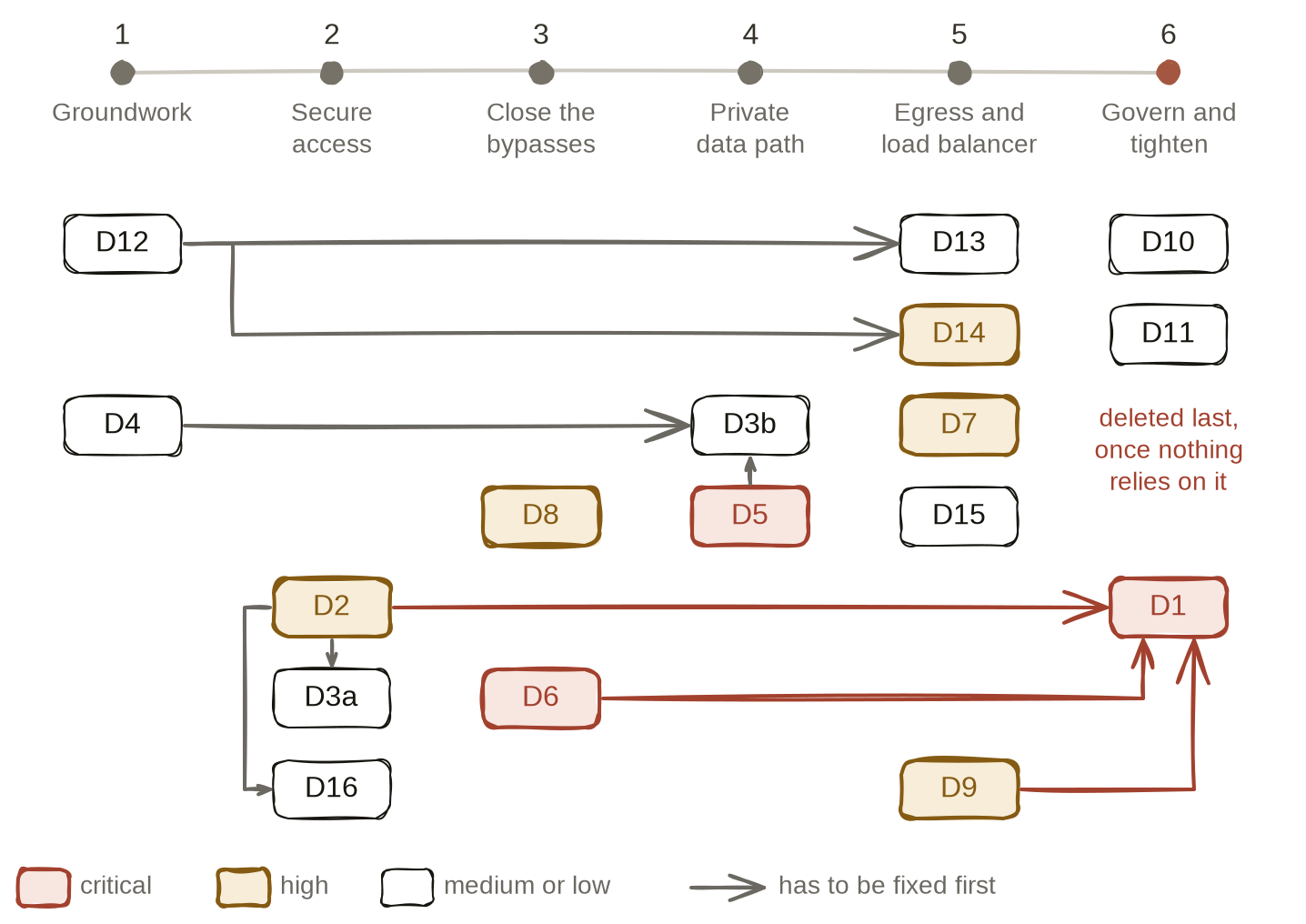
Six phases from left to right: 1 Groundwork, 2 Secure access, 3 Close the bypasses, 4 Private data path, 5 Egress and load balancer, 6 Govern and tighten. Each defect sits under the phase that fixes it, colored by severity. Arrows show what has to be fixed first: D12 before D13 and D14, D4 and D5 before D3b, D2 before D3a and D16, and D2, D6 and D9 before D1, which is deleted last once nothing relies on it.
Each arrow points from a fix to the one it unblocks
  • Add before removing. The IAP-only SSH rule is tested on every VM before the open SSH rule is deleted. In the other order, every engineer is locked out.
  • The legacy VMs keep their public IPs until phase 4. They use them to reach Google APIs and the database, so the IPs can only go once Private Google Access is on and Cloud SQL has a private IP.
  • The allow-all rule goes last. Deleting it shows what was relying on it, so every service first needs its own narrow rule, checked VM by VM.
All 17 defects, in the order they are fixed
PhaseIDDefectSeverityBlocked by
1D4Private Google Access is off on the data subnetMedium-
1D12No proxy-only subnetLow-
2D2SSH open to the internetHigh-
2D3aBastion carries an external IPMediumD2
2D16Metadata SSH keys instead of OS LoginMediumD2
3D6Cloud Run ingress is left at allCritical-
3D8The origin is not locked to CloudflareHigh-
4D5Cloud SQL is on a public IPCritical-
4D3blegacy-api instances carry external IPsMediumD4, D5
5D7Cloud Run egress is private-ranges-onlyHigh-
5D9Egress is completely unrestrictedHigh-
5D13TCP health check on a web backendMediumD12
5D14No Cloud Armor on the legacy backend serviceHighD12
5D15No SSL policy on the HTTPS proxyMedium-
6D10No policy above the projectMedium-
6D11Partner expects transitive accessLow-
6D1One allow rule opens everythingCriticalD2, D6, D9

Following the traffic

Six packet journeys trace one request hop by hop: a product page, a health check, a card charge, the nightly job, an SSH session and the partner reaching the database. Each journey and each defect can be viewed as found or fixed, and a phase rail on the map moves the whole platform through the sequence.

Harbour is fictional. It is not a production template or an audit of a real system, and its names and addresses are invented. More Harbour tracks, such as IAM, are planned.